


Let’s get started…
1. Introduction: The Challenges SMBs Face While Trying to Scale for Long-Term Growth
For small and medium businesses (SMBs), every unresolved checkout issue and every dragging second of page load can result in lost revenue. That’s why choosing web hosting that balances scaling, speed, and cost matters more than ever.
“Your site’s hosting is the invisible salesperson working 24/7 — if it’s slow or unreliable, you lose customers without knowing why.” – Mania Developers
Small and medium businesses often start with a low-budget plan that works initially, but hits a snag when performance issues—such as downtime, checkout failures and slow pages—emerge following traffic growth. This results in lost orders, high bounce rates, and damage to their brand’s image.
Perhaps even more concerning, is the consequent loss of trust from customers—which can be very costly for SMBs in the long term.
According to Google Business, “More than half of mobile visitors leave a page that takes longer than three seconds to load”. Even more, Baymard Institute notes that “nearly 70% of shopping carts get abandoned before checkout — that’s lost revenue SMBs can’t ignore.”
In this article, we’ll explore how to optimize your WordPress website—at the application and server levels—using Cloudways Lightning stack, and how to maximize Return on Investment, ROI for your online business by coupling it with Cloudways’ CPU-Optimized server offerings.
Moreover, we’ll show you how you can scale your business affordably, from starting small to having all the capabilities, features, and technologies you’ll need; especially as your customer base grows and more and more people visit—and buy from—your site.
Essentially, we’ll show you how to get enterprise-level performance at SMB prices. We’ll explain what Cloudways Lightning Stack does, how different server types (General-Purpose/Standard – CPU-Optimized – Vultr High Frequency) differ, and exactly how SMBs can start lean, scale affordably, and maximize ROI as they grow.
2. The Cloudways Lightning Stack — Powering Speed & Efficiency at an Affordable Rate
Cloudways’ Lightning Stack is a preconfigured and pre-tuned web stack—that’s custom on Cloudways—that combines Nginx + Varnish + Redis/Memcached + PHP-FPM + MariaDB/MySQL to squeeze maximum performance out of each server.
Essentially, the Lightning Stack—as the name suggests—attempts to ensure that your site will load as fast as possible, run efficiently (use the memory, CPU resources, querying, etc., without wastage), and remain as reliable as possible.
As a result, your site will not only efficiently handle 100 concurrent users like a breeze—for instance—but still do the same for 10,000 concurrent users.
According to Koddr’s benchmarks, websites using Cloudways Lightning Stack have up to 53% Faster response times on uncached and write-heavy workloads as compared to websites using Hybrid Stack.
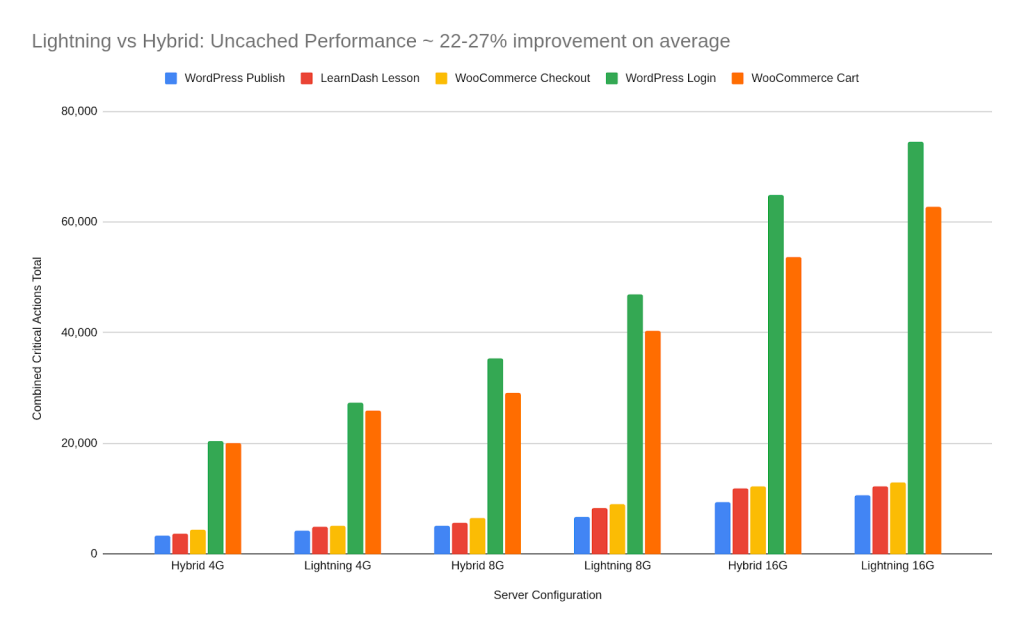
With such improved speeds, you need not worry about how to optimize CPU usage.
Cloudways’ servers use a web stack that comes in two variants:
- Hybrid Stack, which combines Nginx and Apache, with Nginx handling static requests and forwarding dynamic requests to PHP-FPM via Apache2.
In practice, Nginx can be very fast for static content, but is mostly inflexible with PHP requests. As such, the hybrid stack uses Nginx as a reverse-proxy—a gateway handling static content and forwarding dynamic content to Apache2—which then forwards it to PHP-FPM.
Nginx → Varnish → Apache2 → PHP-FPM → Database
This makes the hybrid stack advantageous due to backward compatibility but a bit slow due to the extra hop—from Nginx to Apache2.

As such, the hybrid stack is best suited for applications requiring the use of .htaccess and needing backwards compatibility with WP plugins—or applications—utilizing legacy PHP.
- Lightning Stack, which combines Nginx capabilities with Varnish caching. Nginx handles both static and dynamic requests, passing dynamic requests directly—via Fast-CGI to allow communication with PHP-FPM.
In practice, Nginx handles all requests (static and dynamic)—without Apache—but using Fast-CGI instead to interface with PHP-FPM, i.e.,
Varnish → Nginx (via Fast-CGI) → PHP-FPM → Database
In this setup, the extra hop is avoided as there’s no Apache, since despite Apache being more flexible with PHP (especially for legacy apps and .htaccess rules), it is slower and less efficient compared to Nginx + Fast-CGI. It is limited in that sense.
Why Fast-CGI?
Fast-CGI is the more recent version of the Common Gateway Interface (CGI), which essentially spawned a new process—to run PHP scripts—for every PHP request. This was very inefficient, leading to the creation of Fast-CGI.
Fast-CGI improves on CGI by keeping PHP processes alive, so Nginx can hand off requests—through a socket—without spawning a new process each time. This cuts overhead and speeds up response times.
The result is that requests are passed more quickly and responses come back much faster. In essence, Hybrid Stack is about compatibility, while Lightning Stack is about performance. And benchmarks show that Lightning Stack can handle far more traffic with much lower response times.
Each dynamic request response is also cached by Varnish, making Lightning Stack much faster as compared to the hybrid stack. That is the purpose of Cloudways Lightning Stack. Here’s why it matters for your site and business;
Why It Matters: The Benefits of Cloudways Lightning Stack for SMBs
For an SMB looking to scale affordably and maximize their return on investment, Cloudways Lightning Stack posits the following benefits:
Latency is hugely reduced when Nginx is serving static content and passing dynamic requests to PHP-FPM via Fast-CGI. The extra hop and interfacing with Apache—as in hybrid stack—is avoided, as are the time overheads.
Varnish adds a high-speed layer of dynamic caching for repeated requests. Instead of sending every request all the way to PHP-FPM and the database, Varnish stores responses in memory and serves them directly during subsequent requests.
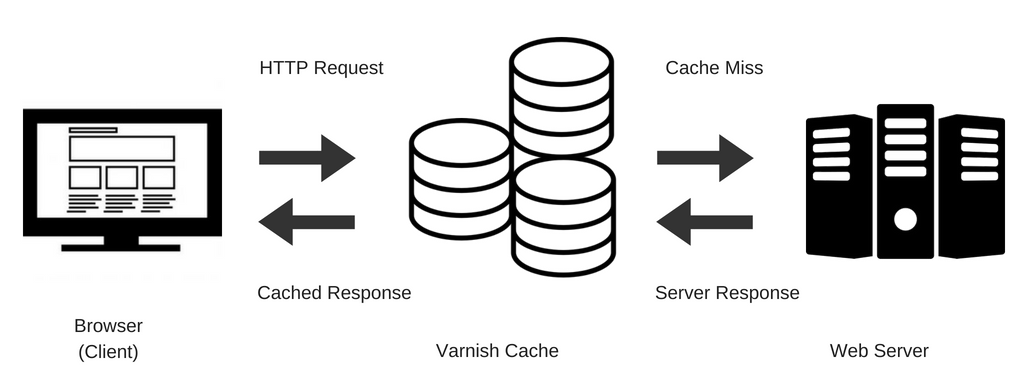
This dramatically reduces server load and improves response times, especially during high-traffic events like flash sales. It is also very useful for category pages or catalog pages in WooCommerce as they are loaded faster.
Instead of repeated queries having to be sent to the server—and DB—every time, Varnish will just serve them from the cache, saving the resources and time the requests would have utilized—over and over again.
Redis/Memcached object caching reduces database hits for user sessions, cart data, and frequently queried objects—extensively lowering server load and running costs. Layering object caching with Varnish further reduces database hits, lowering search/query times.
MariaDB/MySQL are specifically tuned for database-heavy workloads that are often seen in WordPress and WooCommerce. Lightning Stack is designed to specifically handle heavy concurrent database queries/searches.
Real-World Benefits of Lightning Stack for WooCommerce Stores
In a real-world setting, this will mean faster product listing and cart operations, which will in turn lead to fewer abandoned carts. Imagine being able to claw back part of that 70% of abandoned carts that we mentioned earlier.
Moreover, using Cloudways’ Lightning Stack will also mean a noticeable reduction in checkout latency, which would translate to higher conversion rates. You could also achieve a page load that is under 3 seconds, and retain part of that 50% of users you would have lost—if the page loaded longer than that.
According to Koddr’s benchmarks, there were 58% more successful WooCommerce checkouts under load while using Lightning Stack. For LearnDash course views, their tests showed that as compared to Hybrid Stack, there was 85% higher throughput on Lightning Stack.
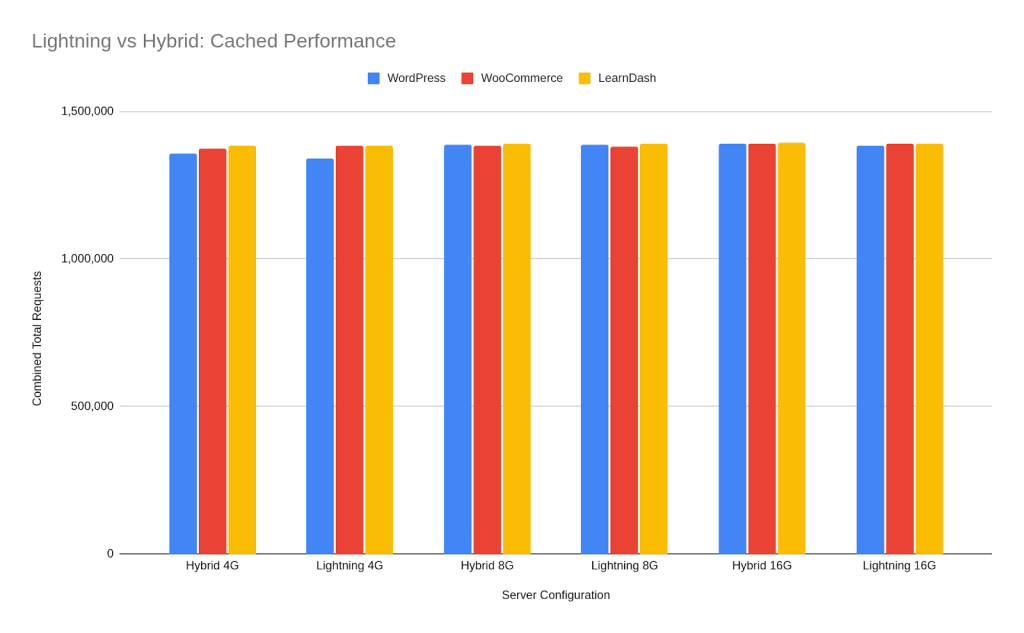
Such a huge gain in throughput would be crucial for LMS/e-learning SMBs. Imagine just how remarkably that would improve learners’ experiences and the reliability of the site while students are taking tests. Wow!
These aren’t just micro-optimizations, they are game-changing for SMBs.
Read more on Easy and Quick One-Click and One-Plugin Optimizations for WordPress
As we mentioned earlier, the optimizations that are part of Lightning Stack mean that you will get more page visits and/or transactions for every dollar of server spend, i.e., it allows you to squeeze more value and ROI from your server, regardless of its size.
Gone are the days of trying to get the biggest server with the biggest memory, CPU, RAM, etc. Yes, bigger can be better, but you wouldn’t compare a huge hybrid stack server to a medium-sized lightning stack server—the latter would be faster.
With Cloudways #LightningStack, even an SMB that is just starting out—and using a 4/8GB RAM server—could get a chance at the best speeds, highest reliability, and dependable sustenance for heavy concurrent usage.
To ascertain that you need Lightning Stack, check whether your site’s mobile load times are below 3 seconds. You can also do a Core Web Vitals check on Search Console—it is a user experience metric that matters a lot for SEO and user retention.
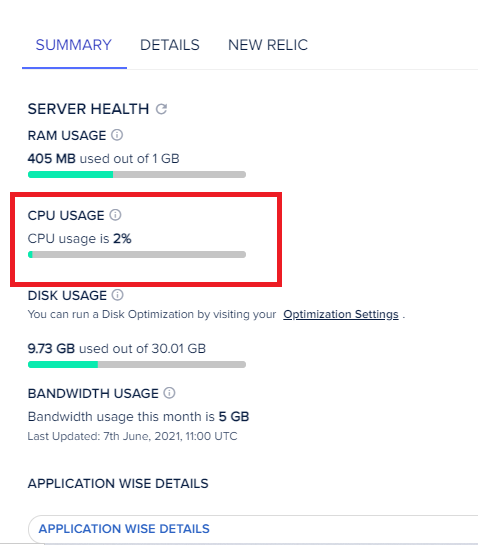
Moreover, you can check your servers’ CPU spikes via Cloudways monitoring. If your WordPress or WooCommerce site fails in any of these, then you definitely need Lightning Stack—like as soon as possible. Maybe it’s the competitive edge the big stores have on yours.
Cloudways’ Lightning Stack is the ‘tuning’ that lets smaller, more affordable servers behave more like high-end instances—without the manual setup!
Get Cloudways Lightning Stack at an affordable price. It could be the competitive advantage your business needs!
You can get a 20% Cloudways Discount by using our promo code ‘MANIAINC‘. We may get a commission when you do or when you get a Cloudways plan via one of our links.
3. The New Vultr & Linode High-Performance Servers
To maximize your business’ Return on Investment (ROI), there’s also the need for highly performant web servers—as your site grows, and you get more and more concurrent traffic. Trust me, you will notice when 100+ users are all trying to check out products—on your WooCommerce store—at the same time.
Types of Lightning Stack-Enabled Servers Available on Cloudways
Cloudways offers three types of web servers, starting with general-purpose (standard) servers, to the more powerful CPU-Optimized servers, and then the highly-performant Vultr and Linode High-Performance Servers.
3.1 General Purpose Servers
General-purpose servers are balanced CPU/RAM servers that fit what most SMBs moving off shared hosting would need
. They are preferable for small WooCommerce stores, brochure sites, and blogs that have predictable traffic levels—think tens or hundreds of concurrent users at a time.
General purpose servers are cost-effective (often the cheapest), have predictable performance, and can be a good starting point for scaling your business with Cloudways.
When just starting out and your site’s traffic is low, and you are on a limited budget—or when your online store only has a handful of checkouts every day, and it doesn’t make sense to pay more for servers than your returns—then these servers could be the best choice for you.
With these servers, you get Cloudways’ impeccable 24/7 support, in-depth server monitoring and stats, server security via Immunify360, and well-working base servers—all at an affordable price. These servers are the industry-standard servers in terms of reliability, security, and uptime.
Explore Cloudways’ General-Purpose Servers and pick the best one for you!
PS: We may earn a commission at no extra cost to you.
3.2 CPU-Optimized Servers
Now, tens of customers doing checkouts on your WooCommerce site can be handled by a general-purpose server, but not hundreds or even thousands of concurrent e-commerce checkouts. When there’s a noticeable lag and a rise in cart abandonments, it signals that it’s time to upgrade your servers.
A simple check for CPU spikes on Cloudways monitoring will tell you that your server’s resources are maxing out. Cloudways have your back covered, however, and the CloudwaysBot will most certainly let you know that you need to upgrade your server—to the more powerful CPU-Optimized servers. This is how we would also recommend that you optimize CPU usage affordably.
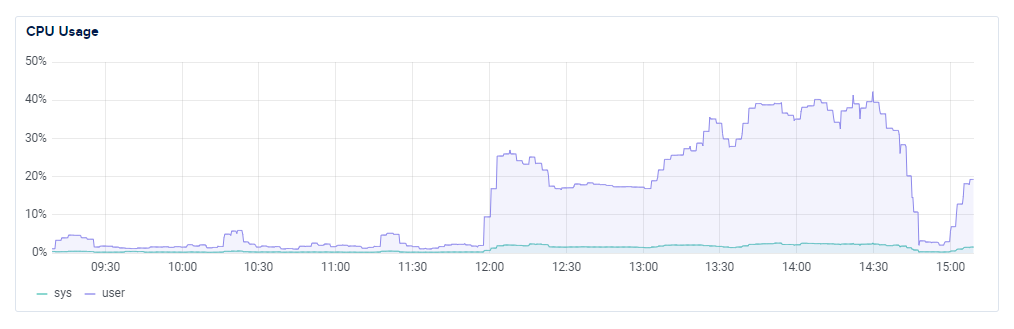
The CloudwaysBot is an always-on monitoring tool on any—and all—Cloudways servers that sends you alerts when there are issues on your server. Yes, Cloudways have you covered. Always!
What are the Cloudways CPU-Optimized Servers?
Cloudways CPU-Optimized Servers are servers with dedicated vCPUs that are built for compute-heavy workloads
. vCPUs are virtual CPUs for virtual machines (VMs) that act as a distinct physical CPU to the VM’s operating system.
CPU-Optimized servers are specifically built for heavy concurrent usage, and for sites with heavy traffic or those frequently undertaking resource-intensive tasks—such as complex DB queries, huge product catalogues, or large WooCommerce stores.
Specifically, WooCommerce stores where hundreds or even thousands of checkouts are occurring at the same time. In essence, Cloudways CPU-Optimized servers are specifically tuned to ensure quick checkout for WooCommerce.
These servers are also ideal for Learning Management System (LMS) platforms where many learners are taking classes or tests at the same time. For instance, the Digital Ocean CPU-Optimized premium droplets have a dedicated CPU—unlike other droplets where CPUs are shared—and couple it with fast NVMe storage.
In the real world, this means that not only does your site have a dedicated CPU for the compute power it needs for complex operations—like a search or query on thousands or millions of database entries—but also fast storage disks to ensure quick read/write operations.
Why It Matters: The Benefits of Cloudways CPU-Optimized Hosting for Small and Medium Businesses
When trying to scale your online business and to be able to do it affordably, it is essential to find the sweet spot between performance, reliability, and cost. Moreover, as your business grows—and your site and traffic outgrow general-purpose servers—CPU-Optimized servers are the next best affordable option. Here is what to expect from these servers:
- Predictable performance. Dedicated CPUs on CPU-Optimized servers prevent slowdowns that are common on shared CPUs. On shared CPUs, events or lags—on other sites—cause slowdowns and lags on all the sites using that CPU.
With CPU-Optimized droplets on Cloudways, however, that will simply not happen—as all the compute resources of the CPU are there to serve your site and your site only.
- Faster execution of complex queries. On Woo sites with large product catalogs—or even on WP sites with huge databases—advanced search filters run faster on CPU-Optimized servers, as there’s both a dedicated CPU (with the compute-capability) and fast NVMe storage for quick input/output.
When the two are combined, queries are executed very fast, and in a way that is not discernible by the user
.
For example, a customer searching a product variant from a list of 10,000 variants will experience a search so quick that they would never tell that the particular product is 1 of 10,000; since it will happen almost instantaneously. Having that level of abstraction is simply fluid for user experience.
- Reliability during concurrency. CPU-Optimized machines can handle many numerous shoppers better—orders are processed faster and there is less queuing. The same can be said for LMS sites—hundreds or even thousands of learners will be able to take a test at the same time, without experiencing any lags, queues, or slow-downs.
In the real world, as an example, if a product search that previously took 500ms suddenly slows down to 2.5s—during a sale or influencer campaign—cart additions and checkout flows on your Woo store will definitely suffer. CPU-Optimized servers are designed to specifically reduce such fluctuations.
As a result, reliability is standardized at a level where query/response speeds during a sale can be comparable to those during a normal—non-sale—day. Everything just works, even when customers flood in.
Explore Cloudways CPU-Optimized droplets with a 3-day free trial.
You can get a 20% Cloudways Discount by using our promo code ‘MANIAINC‘. We may get a commission when you do or when you get a Cloudways plan via one of our links.
We did a deep dive of Cloudways’ CPU-Optimized servers, and you can check it out for more on how these servers work.
3.3 Vultr High Frequency Servers (NVMe + high-clock CPUs)
If you’re really looking for the ultimate setup and to maximize your ROI—give your business’ website all the performance, power, and capabilities it needs—then Cloudways’ High Frequency servers (such as the Vultr High Frequency servers) are the servers for you. You can also get high-performance servers from Digital Ocean on Cloudways.
At its core, a ‘High Frequency’ server is a server with exceedingly high clock speed CPUs (3+ GHz) which are coupled with NVMe local storage—the ultimate setup for ensuring low latency and superfast read/write speeds.
NVMe stands for Non-Volatile Memory Express, a communication interface and protocol designed for fast, high-performance storage devices such as solid state drives, SSDs.
NVMe local storage is particularly powerful in that it increases throughput several-fold as compared to traditional storage. For instance, if a 10GB transfer would’ve had taken 30 minutes on a traditional server, NVMe local storage will do it in 3–5 minutes; easy.
For huge databases, or large product catalogs, searches will be turbo boosted and completed superfast. Like really fast. For those with a developer or technical background, your Elasticsearch queries will just fly—no matter the breadth or complexity of your Elasticsearch index.
High Frequency servers are great for highly interactive webstores, dynamic sites with a lot of complex queries and operations, and Application Programming Interfaces (APIs).
In essence, these servers give you enterprise-level performance and capabilities, at SMB-level prices.
With Vultr High-Frequency servers from Cloudways, you can maximize the return of investment (ROI) for your online business at an affordable price. When your CPU-Optimized server is starting to show wear and slowing down due to heavy concurrent usage, then it is time to move to a high frequency server.
How to Move Your Site to Cloudways’ High-Frequency Servers
The good thing is that Cloudways have thought everything through for you, and allow seamless server upgrades/downgrades with no downtime—at a click of a button.
Moreover, you can migrate your site to Cloudways easily, and they even offer a free migration regardless of site size or complexity, i.e., Cloudways will move your site for you, regardless of whether it is a huge e-commerce store, an LMS site, or a complex custom site. Their engineers will literally do the migration for you, for free. No questions asked.

Beyond that, when on Cloudways and wanting to move from a general-purpose serve to a CPU-Optimized server, for instance—or from a CPU-Optimized cloud droplet to the Vultr High frequency servers—cloning your site is super-easy.
Cloudways provide functionality to allow you to clone your entire server—regardless of the types or number of applications in it—at the click of a button. As such, you can move to the Vultr High-Frequency servers easily, just by cloning your CPU-Optimized droplet to a High Frequency instance.
Mind you, your WP site or WooCommerce store will still be up and serving customers this whole time, giving you the time to set the settings for the new server you’ve migrated to.
Once you are happy that everything is set on the high frequency instance, you can then go ahead to delete your old CPU-Optimized droplet—and even then, Cloudways will keep a backup of that server for 14 days, just in case you need it.
For instance, you may have forgotten how you implemented a certain config or even lost code for a premium plugin you were using. Even so, for 14 days after deleting the server, you can recover it and get that config back. Simple and super helpful.
Talking of backups, Cloudways have the most robust backup architecture of any cloud host I have seen. Not only can you backup a WP or WooCommerce application individually, but you can also backup your entire server with all the applications in it. This ensures that you do not lose any optimizations you’ve made—to ensure a fast checkout WooCommerce site.
You can also schedule server backups on a pre-determined timeframe, and even get to choose whether to store the backup within the same servers’ files or externally.i.e., to a backup storage that Cloudways offer entirely free of charge.
Why It Matters for SMBs: The Benefits of Vultr High Frequency Servers for SMBs
- Increased throughput and reduced latency—thanks to faster NVMe storage.
On a technical note, NVMe uses PCIe lanes and outperforms traditional—older—SATA interfaces. This translates to lower disk latency, and faster file/DB reads/writes for caching and page generation workloads.
Essentially, NVMe allows you to “unlock enormous bandwidth potential”, as attested to by Kingston Technology Company.
- Share-free CPUs dedicated to your site and your site only. No shared CPUs here, or throttles due to issues/high traffic on other websites. Your online business has dedicated resources, and you won’t need to worry about ‘noisy neighbors’.
- Cost-efficiency and reduced cart abandonment. Cloudways’ High Frequency servers are affordable—much more so when you factor in the potential cost of numerous cart abandonments and lost leads.
For instance, if you can claw back part of the average 70% potential cart abandonments—say half of that—and have 20% increased profits, then increasing your server costs by 20%—to meet that increased demand—totally makes sense.
The beauty of it is, yes you are able to meet increased demand, but you also improve your site’s user experience, retain more customers, and enjoy SEO benefits thanks to your site loading fast—even on mobile. A sub-3s mobile load time will be overall beneficial for your business, increasing retention rates, sales, and building on your brand’s image.
- Faster searches/queries and disk reads/writes. With the Linode or Vultr High frequency servers on Cloudways, product searches will happen much more quickly—as will disk and database reads and writes.
Overall, customers will not only navigate through the site seamlessly, but also quickly find the products they need. They can then checkout seamlessly—leaving you to deal with order fulfillment. You’ll essentially forget about trying to improve WooCommerce speed and performance.
- Time savings. Using a high frequency server will free up time taken up while trying to undertake site optimization. Moreover, you’ll save on costs as you will not need a web developer—as much—to help you optimize and improve site speed.
Other Cloudways benefits, features, and add-ons
Beyond the benefits we’ve talked about above, you will also enjoy other benefits just for hosting your site on Cloudways. These include the following:
Seamless migrations and upscaling/down scaling
With Cloudways, you’ll forget the hustle of trying to migrate your site or upscaling (or down scaling) your server. Gone are the days you needed to download a 10GB backup of your site and then move it over to your new server, unpack it, and then reconfigure your site from scratch. Gone are the technical complexities of doing that!
On Cloudways, you can move over your entire site to their service easily; and enjoy one free migration—where their tech team will do the full migration for you.
Beyond that, when your site is on Cloudways and you want to scale it—upwards or downwards, there is one-click functionality for doing just that.
A scaling op that would have taken days or weeks can now just happen in an hour or two. No complex configs, no funny unpacks, and no technical headache.
Cloudways Integrations (Add-ons) for Improved Performance
Cloudways also offers numerous performance-oriented integrations for your site such as; Elasticsearch—an indexing/search tool that turboboosts DB searches by creating an index of all the DB objects (options, products, templates, etc.) on your site and then delivers query responses much faster—and RabbitMQ.
RabbitMQ is a message queueing tool that queues request packets to ensure that they are delivered sequentially—and not overwhelming your site by having too many requests try and be given responses at the same time.
Moreover, Cloudways also offer a Cloudflare Enterprise plan integration for a fraction of the cost. Cloudflare is a global CDN and security platform that sits as a proxy between the net and your site; ensuring security, handling caching, and delivering your content to users from the servers closest to them.
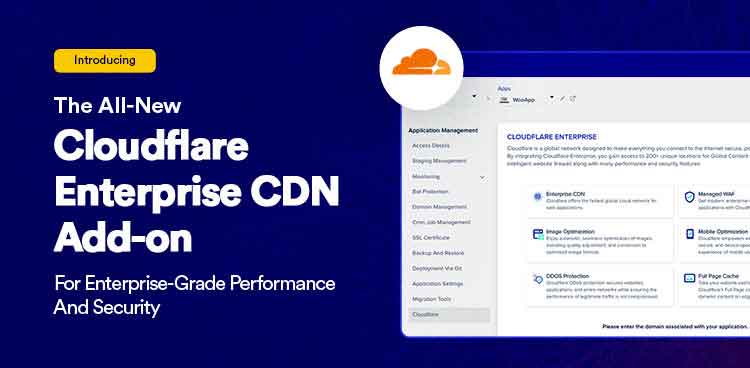
Were you to go it alone, the Cloudflare enterprise plan would cost you thousands of dollars a month; literally thousands, pm! Cloudways, on the other hand, offer it at just a couple dollars a month… Imagine that!
Related: Free and Paid Ways to Secure WordPress: Essential Tips for Securing Your WordPress Site
- Choice and Variety of Cloud providers on Cloudways. Cloudways doesn’t lock you onto a single cloud server provider. No. You get to choose from a variety of cloud providers—such as Google Cloud, AWS, Linode, Digital Ocean and Vultr. These are the biggest players in the field and with Cloudways, you get access to their server offerings at an affordable price.
For an SMB whose WooCommerce store or LMS platform is heavily reliant on APIs, dynamic stock/price updates, or even real-time chats or personalization—and where each millisecond matters—then Vultr High Frequency servers are the way to go. It is the easiest way to ensure a fast checkout WooCommerce.
You will be able to maximize ROI by ensuring that performance gains positively correlate to revenue, despite the complexity of your site, the extent and speed of personalization it undergoes, the size of your catalog, or even the frequency of catalog updates.
Get the Vultr High Frequency droplets on Cloudways today and maximize your SMB’s ROI at an affordable price.
4. Why Lightning Stack + High-Performance Servers = Maximum ROI—A Winning Formula
By coupling Lightning Stack with High-Performance servers on Cloudways, you are able to maximize ROI—as we see in the formula;
Optimized software (Lightning Stack for max compute power) + Right-sized hardware (CPU/Disks for fast query response) = More transactions per dollar spent on servers = Maximum ROI
Remember that ‘sweet-spot’ we spoke of earlier, maximizing ROI is about balancing performance, features, and capabilities with cost.
Here’s how combining Cloudways Lightning Stack with High-Performance servers will maximize your SMB’s return on investment:
Lightning Stack Reduces Wastage
The Cloudways Lightning Stack reduces redundant CPU and database workflows, allowing your server to do more useful—and efficient—work per CPU cycle.
“Vultr High Frequency uses 3+ GHz vCPUs and NVMe local storage for low latency and faster I/O.”
– Vultr.
Cloudways Servers Supply Headroom to Mitigate Latency Spikes
Cloudways High-performance (or even CPU-Optimized servers) give your site the headroom to absorb heavy compute and usage spikes, without latency fluctuations.
In benchmark tests, Lightning Stack handled up to 46% more simultaneous users in e-commerce tests—as compared to hybrid stack. Similarly, LMS tests for high-concurrency situations showed a jump of 73% in throughput. Super impressive!
Essentially, your site will have the capability and capacity to deal with user requests—and deliver reliably—even during high concurrent usage. To be able to have such power even on smaller and much more affordable servers—like the 4GB RAM or 8GB RAM servers—is simply life-saving.

Furthermore, it allows you to scale your business reliably and maximize your return on investment at very affordable prices.
For instance, during a sale on your WooCommerce store, not only will you get the most-capable compute infrastructure, you will also get servers using the latest technology. Good examples include the Digital Ocean premium droplets that use the latest CPU tech—AMD-EPYC CPUs or the latest generation Intel Xeon CPUs.
“DigitalOcean’s CPU-Optimized and Premium CPU droplets offer dedicated vCPUs and NVMe options for compute-bound workloads.”
Combined Net Positive Effect on Conversions
With Lightning Stack + CPU-Optimized/High-Frequency servers, your pages will load faster with fewer errors, which will translate to better UX and faster searches, which will—in turn—lead to more conversions and a direct revenue uplift.
Essentially, here’s how this setup will maximize ROI:
Faster pages + fewer errors = better UX → more conversions → direct revenue uplift
Forget a 70% cart abandonment rate or a 3s+ mobile page load time, and all the opportunity cost of a slow, unresponsive site. For an affordable price, Cloudways Lightning Stack + Vultr High-Frequency Servers will ensure you get several times more return on investment as compared to the server costs you will incur—on a year-to-year basis. Comparing the two;
On a slow traditional server:
Slow page loads + High cart abandonment rate + poor user experience + brand damage + sales and profits lost = Huge opportunity cost (X) and stunted business growth
Combining Lightning Stack with Vultr High Frequency servers, however:
Fast page loads (<3s) + Low cart abandonment rate + good user experience + brand trustworthiness + increased profits and sales + slight server cost increase (V) = maximum return on investment (Y) and accelerated business growth
I dare say that on making the move, you’ll realize Y (maximized ROI) that’s several times the server cost increase, V.
“Faster pages aren’t a bonus — they’re a revenue channel.”
Increased Operational ROI
Beyond the financial ROI you’ll realize with this setup, you’ll also enjoy operational return on investment. You’ll have reduced—or even fully eliminated—the need for 24/7 DevOps, i.e., you won’t need a web developer to improve site performance or ensure efficiency as often. This not only lowers operational costs, but also staffing costs as well.
The funds you’d have used for web development can be channeled as an investment on your business—and on improving order fulfillment. Why? Because you’ll be getting many more orders as a result of the move.
Timely, Cost-Effective Troubleshooting
Cloudways have also introduced Cloudways CoPilot—which we’ll look into in an upcoming article—that’s an AI-powered troubleshooting tool that integrates directly with your server and helps you troubleshoot any bottlenecks or issues your site may be experiencing.
Essentially, an on-server intelligent troubleshooter/web developer available 24/7.
And the beautiful part? You’ll get free credits to enjoy CoPilot troubleshooting every month for the first 6 months!
Consequently, you’ll spend less time firefighting and your site will need far fewer emergency upgrades, i.e., you won’t need to constantly upgrade your servers in reaction to issues due to increased concurrent usage.
You can get a 20% Cloudways Discount by using our promo code ‘MANIAINC‘. We may get a commission when you do or when you get a Cloudways plan via one of our links.
SEO Benefits
From an SEO point of view, Core Web Vitals and page experience are crucial for discovery and growing your site’s traffic; as they are part of Google’s ranking signals.
With Cloudways’ #HighPerformanceServers + Lightning Stack, you’ll have better user-experience metrics, which will help your SEO efforts and bring in organic traffic.
How to Scale Your Online Business on Cloudways—Long-Term Growth at an Affordable Price
In terms of scaling your online business—starting small and growing to where you’ll need to maximize ROI, we’d suggest this approach:
Start with a General-Purpose (Standard) Server → when you get to a point where you now have large catalogs and there’s heavy concurrency usage on your site, move to the more powerful Cloudways CPU-Optimized Servers → finally, when you need to reduce millisecond latency—for dynamic features or intense traffic levels and concurrency, move to the extremely powerful Vultr High Frequency servers—and maximize ROI for your SMB.
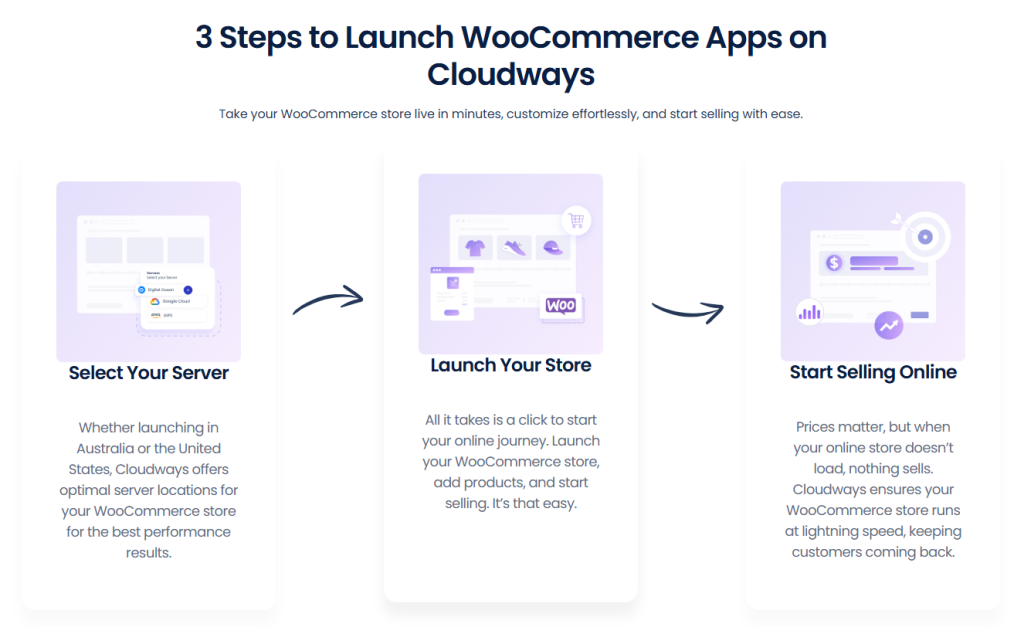
5. Real-World impact on SMBs and eCommerce Stores— Case Studies & Metrics showing How to Maximize ROI for your SMB with Cloudways CPU-Optimized Servers + Lightning Stack
Case Study 1: From Local Fashion Brand to a National Store
A local fashion brand, Frizz started their WooCommerce store on a traditional web server, and when a major influencer mentioned their product, their store traffic effectively doubled.
Without the scaling capabilities needed, Frizz’s WooCommerce store saw slow product searches and pages, and numerous failed checkouts.
After moving to Cloudways Lightning Stack + a CPU-Optimized DO droplet, however, product pages times dropped significantly, checkout success rates skyrocketed, and organic SEO visibility increased—as follows:
Page load improved from 4.2s to 1.7s; essentially cut by half. Checkout success went up 32%, with the stores’ checkout failure rate of 62% essentially halved. Moreover, monthly revenue went up 19% during their next influencer campaign.
Essentially, for just a <$100 increase in monthly server costs, Frizz essentially made 20% more revenue, which was around $5,000 per month.
Benchmark tests back up these figures. For instance, a timed test showed that a WooCommerce store on an 8GB DO server processed 4809 checkout actions while on Lightning Stack; as compared to only 3035 on Hybrid—an impressive improvement of 58% more checkout actions.
Case Study 2: Black Friday Seasonal Sale on a WooCommerce Store
A growing tech accessories online store, HJ needed a solution to allow them to fully maximize their revenue during the Black Friday seasonal sale. Being a popular brand, the HJ WooCommerce store would always experience long checkout queues and heavy concurrent usage—which would almost always crash the site—often 2 hours into the peak sales window on Black Friday.
HJ needed a working solution and not always having their hosting provider on call during major sale events. To ensure they scaled affordably, the store’s owners decided to try out Cloudways Vultr High Frequency servers with Lightning Stack. They reached out to Cloudways, were able to enjoy the free site migration to move the Woo store over, and started scaling.
On setting everything up, they also decided to enable Varnish + Redis on Lightning Stack, pre-warm their cache, and monitor—with Cloudways’ monitoring tool—one week prior to Black Friday.
Pre-warming a cache entails initiating a warmup cache request ahead of time and pre-filling your cache with the data you know your site will need—before users request it.
By doing this, HJ was able to undertake pre-sale page loading time tests, test automatic troubleshooting with Cloudways CoPilot, and once satisfied, were confident that their Woo store was ready to handle the Black Friday sale.
Come Black Friday, checkout speeds were superfast and querying products from the DB was almost instantaneous. Additionally, during peak hours, more than 300 customers were able to check out within microseconds of each other.
Sales were up more than 40%, an insight that they were able to acquire thanks to a NewRelic integration on Cloudways. The HJ team was also able to see that throughput had gone up a whole 0.5.
Even more, Page loading speeds were consistent at around 600ms, and satisfied customers even commented on HJ’s socials that this Black Friday “things were moving super smoothly”.
By day’s end, the WooCommerce store had experienced no downtime whatsoever during the peak sales window, cart abandonment was significantly reduced, and many more orders than usual were successfully completed.
Through Lightning Stack’s performance and checkout UX benefits, there were no revenue leakages—in terms of avoidable cart abandonments, and HJ was able to claw back from the 70% abandonment rate significantly. The setup allowed them to optimize CPU usage while ensuring a fast checkout WooCommerce.
Koddr’s LMS benchmarks back these numbers up. Timed tests showed that a Vultr High Performance 4GB instance handled 3123 lesson progressions on Lightning Stack, as compared to only 2034 on Hybrid Stack. Again, a 53% improvement. The high-performance server was able to handle many more concurrent actions while on lightning stack than it would have on hybrid stack.
The takeaway: Faster pages aren’t a bonus — they’re a revenue channel.
Related: How to Optimize WooCommerce for Speed and Security
Speed → Trust → Conversions → Revenue—and a huge improvement in Core Web Vitals and SEO.
6. Future-Proofing Business Growth with Cloudways CPU-Optimized Servers + Lightning Stack
Start Small, Scale Non-Disruptively
With Cloudways, you can start small with their general-purpose servers, gradually grow your business, and then scale to either their CPU-Optimized or High-Frequency droplets; as per your business needs—all while ensuring you maximize ROI and keep costs manageable.
Moreover, you will get a variety of providers and freedom of choice to either scale vertically—get a bigger instance, or horizontally—by creating more instances.
For a small agency site hosting client websites, for example, this means that you have total control over your setup and the tools to ensure that you’re able to provide your clients with the very best service.
Since Lightning Stack shows the largest advantage on small servers, SMBs can confidently start small without worrying about hitting performance ceilings too early—avoiding entirely the financial pressure and stress to upgrade to bigger servers.
Start a Cloudways Free Trial today and begin scaling your SMB to long-term growth!
No Downtime on Migrations
Whenever the need to upscale/downgrade your server arises, you’ll then enjoy little to no migration friction. You can rest assured that the Cloudways CPU-Optimized Servers + Lightning Stack setup will remain consistent and the performance tuning you’ve done—and have been doing—will carry across tiers.
You’ll also have peace of mind as Cloudways have one of the industry-best documentation and guides for how to use their platform—and quickly solve any issues that may arise. Read more about Cloudways’ features.
Introducing Cloudways CoPilot
Thanks to your impeccable timing, you will also get to enjoy free Cloudways CoPilot credits for the first 6 months.
Cloudways CoPilot is an AI-powered assistant built into Cloudways that provides server and application diagnostics, root-cause analysis and suggested fixes, as well as one-click SmartFixes—to reduce the time it takes to resolve issues.
Consequently, it lowers the need for a full-time server admin/web developer for numerous troubleshooting tasks.
“Cloudways Copilot provides AI-driven diagnostics and one-click SmartFix workflows to speed issue resolution,”
– Cloudways.
In our next article, we’ll delve into how Cloudways CoPilot diagnoses real-world issues—such as failed backups, slow DBs, and high INODEs—and how to use CoPilot SmartFix to safely resolve them.
Related: Mastering Server-Level WordPress Optimizations: Proven Strategies for Blazing-Fast Performance
Remember CloudwaysBot? Cloudways CoPilot is like CloudwaysBot on steroids! Stay tuned.
7. Conclusion: Why Pick Cloudways CPU-Optimized/High Frequency Servers + Lightning Stack to Scale Your Online Business?
Scaling from tens of users to thousands—or even hundreds of thousands of users—can be daunting for SMBs. It is also very expensive when trying to do it on traditional servers.
Often, the server tech is old, the resources shared, and the providers lacking adequate support teams/capabilities—if any at all.
To effectively scale from day one to thousands of concurrent users and complex database queries, SMBs need the technology, features and capacity to handle growth while keeping costs manageable and maximizing their return on investment, ROI.
Here’s where Cloudways CPU-Optimized servers—and Vultr High Frequency Servers—come in.
Coupled with Lightning Stack, these servers not only have the compute power for heavy concurrent traffic and numerous concurrent WooCommerce checkouts, but also the read/write speeds to deal with searches through huge catalogs or databases. You can, therefore, easily optimize CPU usage while keeping costs low.
At every stage of scaling your online business, Cloudways gives you the choice and flexibility to enact a stack that works for you—and more importantly, at a price that works for you.
Coupled with their numerous performant add-ons, and their upscaling/down scaling tools, you’ll have all you need to grow your business and scale it to reach your goals.
Moreover, with intelligent troubleshooting tools such as Cloudways CoPilot, you’ll save on site administration and web developer costs; saving more on costs and time—and worrying less about increased concurrent usage.
Once your business has grown and your site is pushing the conventional limits of usage, you can rely on Linode/Vultr High Performance servers on Cloudways + Lightning Stack to push the limits of what’s possible—no downtime, no hidden costs, no BS—just pure performance.
Essentially, Lightning Stack + the right server—with fast disks, latest tech/hardware, at an affordable price = Higher conversions, lower costs, and leaner workflows and teams.
If ordinarily 70% of carts are abandoned on e-commerce sites—and 53% of mobile users leave when page loads take more than 3 seconds—then why not claw back some of that lost traffic and revenue?
Why not affordably scale your online business and also enjoy headroom that’ll come in handy during sale periods or increased traffic?
Your site’s hosting is the invisible salesperson working 24/7 — if it’s slow or unreliable, you lose customers without knowing why.
Related: 5 Reasons Why Your Website Needs Managed Cloud Hosting (and Why We Think Cloudways is the Best)
Start small. Scale smart. Maximize ROI—At an SMB-Friendly Price
Take advantage of the Cloudways Free Trial and whip up a test CPU-Optimized droplet (or a Vultr High Performance droplet) + Lightning Stack and see what sublime UX and speeds would feel like…
More Conversions, Better UX, More Customers Retained, Increased Brand Reputation & Trustworthiness—and a host of useful, powerful tools and features—are waiting for you on the other side! Cheers!
You can get a 20% Cloudways Discount by using our promo code ‘MANIAINC‘. We may get a commission when you do or when you get a Cloudways plan via one of our links.