


Contents
- 0.1 RelatedPosts
- 0.2 Why Google’s Gemini 3.5 Pro Is Facing Delays: Inside the AI Giant’s Biggest Challenge Yet—and Why OpenAI and Anthropic Are Pulling Ahead in the Agentic Coding Race
- 0.3 Why Anthropic Restricted Fable 5 and Mythos 5: National Security Concerns, AI Jailbreaking, and the Future of Frontier AI
- 0.4 All You Need to Know About Seedance 2.0: ByteDance’s Next-Gen AI Video Model
- 1 1. Introduction: The Stresses of Cumbersome Host Troubleshooting for WordPress/WooCommerce
- 2 2. Introducing Cloudways CoPilot: The New Tool That Could Be a Game-Changer for Web Server Troubleshooting
- 3 3. Cloudways CoPilot Applications & Use Cases Copilot Covers
- 4 4. How Cloudways CoPilot Works for SMBs 24/7:
- 5 5. Real Customer Proof of Cloudways CoPilot’s Time and Cost Savings, and Its Impact on Server Troubleshooting for SMBS
- 6 6. Who Is It For?: Businesses and Individuals That Could Benefit From Using Cloudways CoPilot Intelligent Troubleshooting Assistant
- 7 7. Key Benefits Breakdown: What CoPilot on Cloudways Could Mean for Your Business
- 8 8. Why Cloudways CoPilot?: Why It’s Useful for Small and Medium Businesses, Developers and Freelancers
Let’s get started…
1. Introduction: The Stresses of Cumbersome Host Troubleshooting for WordPress/WooCommerce
If you have ever had a client reach out in the middle of the night because their site has crashed—and you’re forced to frantically SSH into the server trying to figure out why MySQL just stopped responding—you know the pain of WordPress troubleshooting, especially when under pressure.
As an agency managing tens or even hundreds of sites, for example, reactive troubleshooting can be such a headache. Website developers end up wasting endless hours researching server issues online. Think of the endless deep dives into your hosts’ documentation and help guides, the endless Google searches, and the time and effort it takes, just to find the correct solution—a generic one that will fit enough to your custom setup.
The fact of the matter is, manual server monitoring and troubleshooting does not scale. You can easily lose hours and hours diagnosing something that turns out to be a rogue plugin, your servers’ disk filling up, or even a misconfigured cache, e.t.c.
Additionally, after finally figuring out what the actual issue was, you now develop a persistent anxiety that the generic fix you Googled for hours, may not stick. As an SMB managing multiple clients’ sites, you deserve much better.
The truth is, no matter how experienced you are, managing server health across numerous websites can feel like juggling flaming swords. Even more, while monitoring tools tell you something’s wrong, they rarely tell you how to fix it.
That’s where Cloudways CoPilot quietly changes the game. In this article, we’ll show you how you can overcome all these issues with a relatively simple—yet very intelligent—solution: Cloudways CoPilot.
Moreover, we’ll show you how you can leverage it to ease your host troubleshooting work, keep a 24/7 eye on your WordPress/WooCommerce server, and get quick solutions for server issues—any time of the day, at the snap of a finger.
With Cloudways CoPilot, you get deep insights into your custom setup, and you’ll know the what, where, when, and most importantly: how to fix it.
may be the solution you are looking for, and I promise you it is not just another server monitoring tool; it is much more than that—a hands-on collaborative troubleshooting assistant that could change the way you handle #ServerTroubleshooting for life—at the fraction of the cost of hiring a DevOp Engineer!
2. Introducing Cloudways CoPilot: The New Tool That Could Be a Game-Changer for Web Server Troubleshooting
What is Cloudways CoPilot?
is an AI-powered server monitoring and troubleshooting assistant that constantly keeps an eye on your websites’ critical components, detects issues as they happen, and provides speedy, actionable resolution steps—with specific code fixes.
Cloudways CoPilot is included in all Cloudways Flexible plans, and is essentially the same as having a DevOps engineer monitoring your WordPress or WooCommerce server 24/7!
Cloudways CoPilot stands out in that it identifies issues before they lead to downtime, suggesting fixes, and even providing snippets of code that could work as a solution to the identified issues—instead of just giving you basic ambiguous alerts.
Where other monitoring tools just point out the haystack—where the proverbial needle (issue, in our case) may be, #CloudwaysCoPilot will point out the needle, tell you more about which haystack it could be in, and give you step-by-step suggestions on how to fish it out.
CoPilot is always on and always working for you and your web stack. It is built as a 24/7 automated issue detection and resolution guidance tool; and it works out of the box—no fancy complicated configs, just an ON button and you’re set. No more sleepless nights and, thankfully, your web stack will be in good hands.

I knew that Cloudways has been working on an intelligent #TroubleshootingAssistant and on using CoPilot, it feels less like a monitoring tool and more like having a DevOps engineer on call 24/7.
CoPilot uses intelligent automation—think an AI-powered troubleshooting partner—that watches your servers in real time, spots problems before they bring your site down, and on top of notifying you, walks you through digested, well put-out fixes.
What is Cloudways CoPilot SmartFix?
Cloudways have even gone a step further and introduced CoPilot ‘SmartFix’ which provides one-click fixes for common server issues. For instance, your agency website could have maxed out its Varnish cache memory. With CoPilot, you’d only need to use a SmartFix—such as rebooting your server—to clear out the cache. Moreover, CoPilot will also suggest that you upgrade your server, or just your disk size, to avoid the issue recurring in the future.
Why It Matters: My Real-World Experience Using Cloudways CoPilot to Troubleshoot WordPress Server Issues
Instead of just being pinged with a red alert, Cloudways CoPilot explains why something is awry, where it is happening, and how to fix it
—saving you frantic trips to Stack Overflow or the developer documentation rabbit hole. Imagine all the searches and AI Overviews you’d have gone through; just to know that you could simply clear Varnish just by rebooting your server.
Furthermore, Cloudways servers are super kitted-out. On the server dashboard, Cloudways even provide you with a ‘Purge Varnish’ button… Imagine that!
No SSH-ing into your server to ‘ls -l’ finding your varnish service name and then trying endless ‘systemctl restart varnish’ or ‘systemctl restart varnishd’… ???
Forget that, a one-click button and you’re done. Simple.
In the real-world, CoPilot makes such a huge difference—it doesn’t just tell you there is smoke; it clearly indicates which wire is burning, where the fire started, and how to put it out.
In our example above, that would be something like: Varnish is maxing out due to concurrent traffic on site X—one of your clients’ sites—and since you’re running tens of these sites, their endless cron jobs are piling on to Varnish’s usable memory; as cron jobs (by default) run on each user visit, and are causing Varnish to be overstretched.
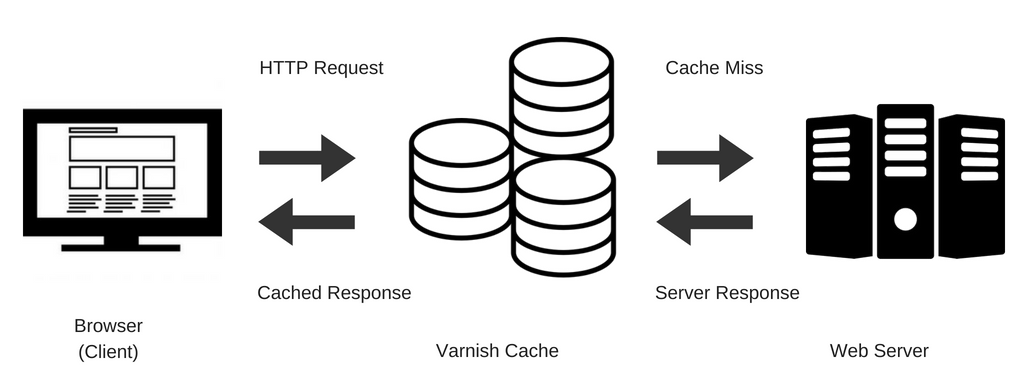
CoPilot would then suggest that you reboot the server or use a ‘Purge Varnish’ SmartFix. The intelligent assistant also goes further and shows you how to set up a system cron to offload the cron jobs, and their being triggered on each new user visit.
Once you try that out and still face issues, CoPilot will remember what steps you’d taken, and suggest increasing your disk size, or even something like activating the RabbitMQ and ElasticSearch add-ons—to ensure they share the burden with Varnish during high concurrent usage.
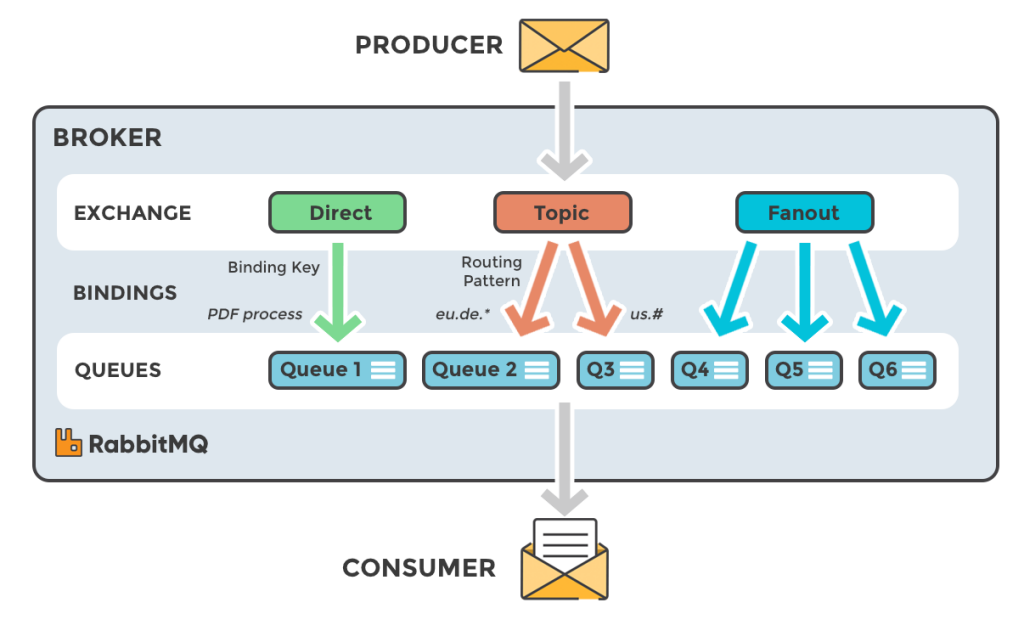
RabbitMQ and ElasticSearch Add-Ons on Cloudways’ Servers
RabbitMQ
is a queueing add-on that will queue messages and deliver them sequentially—one after the other—for processing. As such, the DB won’t be bombarded by thousands of requests all at once.
ElasticSearch, ES, on the other hand, creates an index of all the posts, options, and objects in the DB, and turboboosts searches—by fetching them from the index instead of the WP database.
In effect, if you’re running a WooCommerce store—or even a LearnDash LMS—searches from the database won’t lag the entire stack and Varnish won’t be left to try and cache things that ES or RabbitMQ would have easily handled.
Redis Pro Object Caching
Additionally, all Cloudways servers come with Redis Pro Object Caching—the Pro plan of the plugin, offered completely for free—which handles caching for database objects. Therefore, any recurring DB requests will be served from the cache on subsequent requests—and there won’t be a need for the data to be queried from the DB each time.
Why CoPilot is Much More Than Just an ‘AI Tool’ or ‘AI Assistant’
CoPilot is much more than just another ‘AI’ tool or AI assistant—it’s a troubleshooting Swiss penknife for almost any server issue you may encounter. CoPilot excels in its intelligence and accuracy… and it only gets better the more you use and interact with it—and it remembers. No more background AI model switches while you’re trying to get an issue sorted.
A good way to put what it’s like using Cloudways CoPilot is that: it is like having a second pair of eyes that are always awake, always keeping an eye on your stack, and always a step ahead.
Personally, I found its ability to recall past issues (and fixes) super helpful, as was its consistency. Once you’re working together to troubleshoot an issue, CoPilot will stick with you all the way, and adjust dynamically to the morphing situation. It’s like having the Cloudways documentation open, pre-searched, and already pointing to your particular problem—only this time, a befitting solution and how to apply it are included.
3. Cloudways CoPilot Applications & Use Cases Copilot Covers
comes in handy in numerous situations, and the intelligent hands-on assistant is suited to the following applications and use cases.
Server Performance Issues:
File Permissions Issues
Ever had persistent server problems that just won’t go away?
Maybe it is file permission issues, and you are unable to update or upload plugins; maybe your CPU keeps maxing out on you, especially when you need it—and there are a lot of concurrent users trying to make purchases on your e-commerce store. Cloudways CoPilot is specifically designed to deal with these and many other web stack performance problems.
With its useful set of capabilities, CoPilot is suited to helping you deal with any server performance issues you may have, i.e., with Apache, Nginx—and even MySQL optimization—by not only pointing out the likely cause of the issue, but also getting you specific and custom troubleshooting fixes—that will suit your web stack.
High CPU Usage and Memory Consumption Issues
Beyond the issues with file permissions and memory mentioned above, CoPilot can help you also with High CPU usage and memory consumption issues. For instance, maybe you have a plugin that keeps downloading huge 20+GB backups locally to your server’s storage.
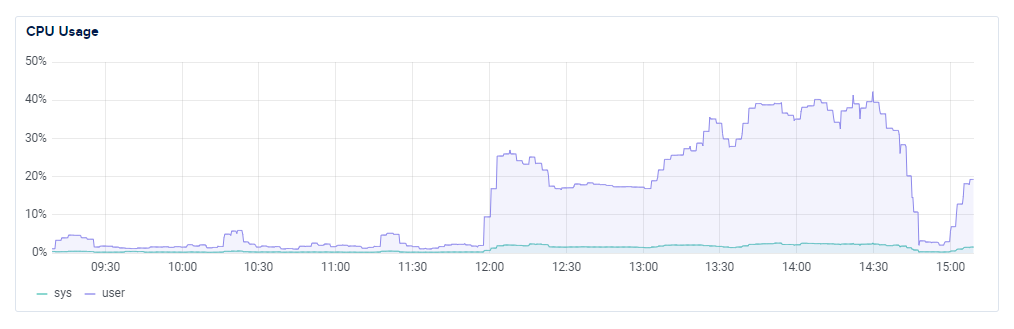
With CoPilot, you will be able to point out the specific plugin, the logic/code it uses to do (and store) the backups, and CoPilot will also suggest code modifications/SmartFixes to stop the plugin from keeping any—or numerous—backups on your server’s disk and filling up storage.
Cloudways’ Extensive Features that Help Ease Server Troubleshooting
On-Server and Remote Server Backups
Moreover, Cloudways’ servers come with a super robust server backups infrastructure that not only allows you to schedule backups—both at the server and application levels—but also gives you the choice to either backup on your server’s storage disks or on a remote storage facility—that Cloudways offers for free. Yes! Essentially, Cloudways will keep backups for you and not charge you to have them kept remotely.
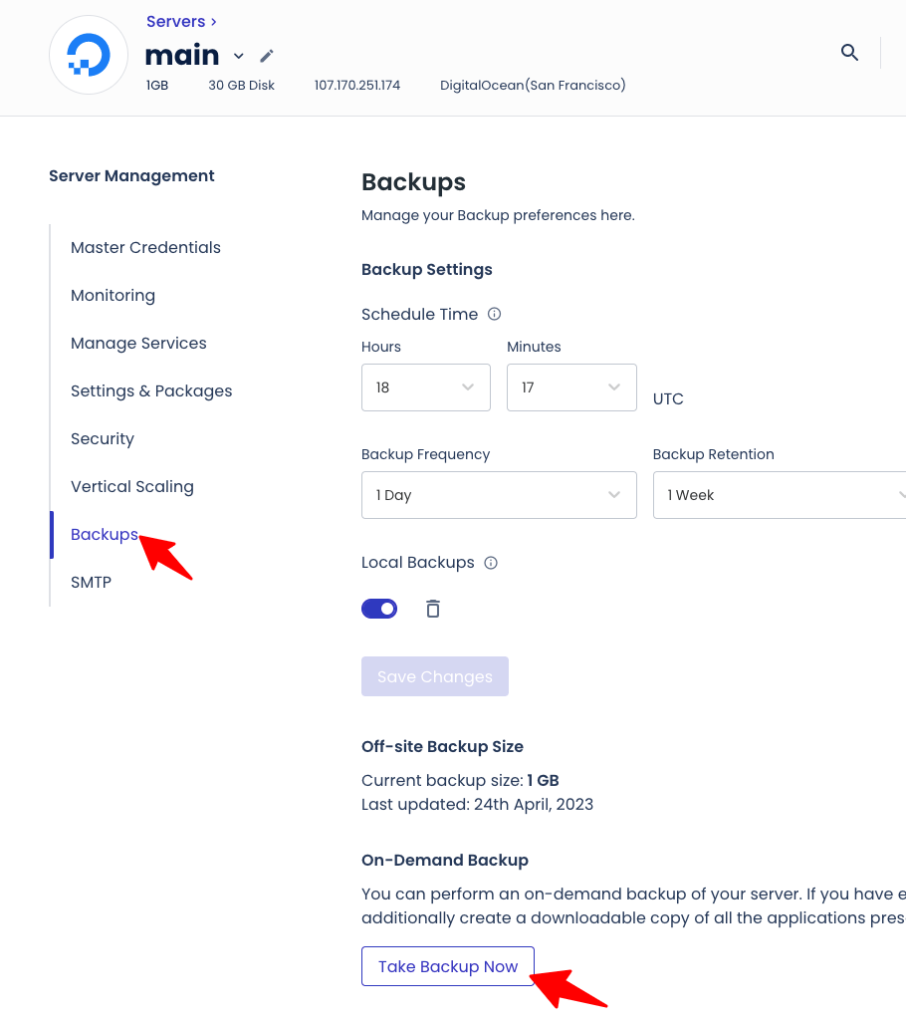
And in the unlikely case that you need a backup—maybe a customization or code modification has gone wrong—any and all servers or applications that you delete will have their backups automatically preserved for 14 days.
Therefore, you have the peace of mind to do development work without worrying about copies of your server or recently deleted servers—and applications—being lost forever.
Cloudways’ Robust Staging Management Platform
Cloudways also have a very robust staging management platform
where you can create a copy of your WordPress or WooCommerce application and test config changes or plugin installs—and so much more—safely, and without affecting your production (live) site.
The beauty of this staging management infrastructure, additionally, is that with just the click of a single button, you can pull (copy over) your production site to the staging site, or even push (apply) changes made on the staging copy to the live site.
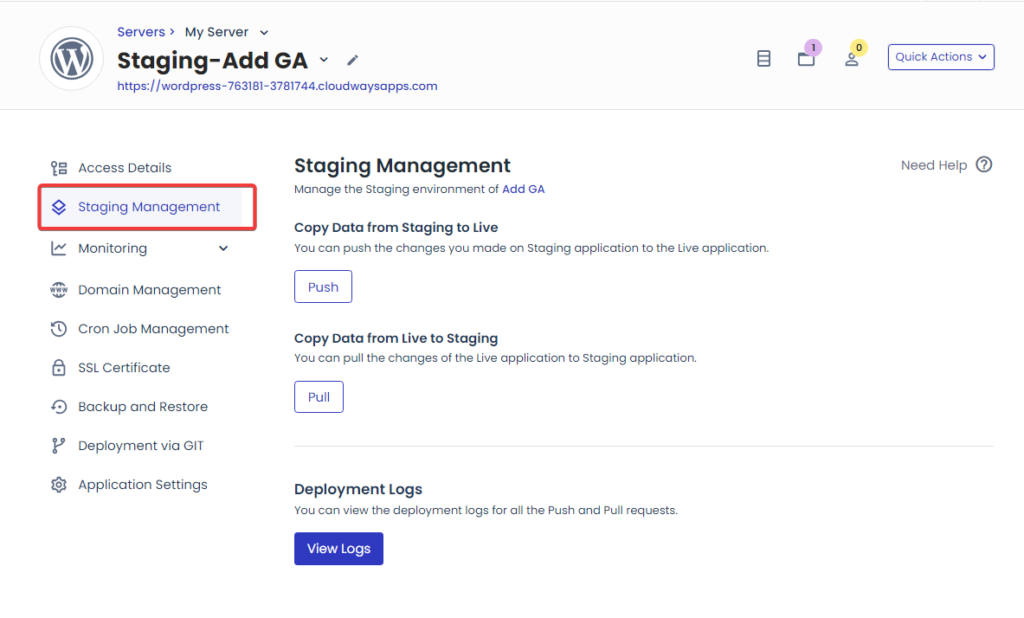
As such, what could have been a stressful and tense customization or DevOps routine can now be undertaken stress-free and without worrying about backups—and rolling back to previous versions of your stack. Just like that—and did I say, the remote backup and site staging features are completely free of charge and offered as complementary add-ons for any Cloudways Flexible plan.
Check out Cloudways Flexible plans and find one that’s suited your needs—aren’t you tired of spending hours on end trying to optimize WooCommerce for speed?
With Cloudways CoPilot, be ready to say goodbye to slow response times and seemingly unending application bottlenecks!
Related: How to Optimize WooCommerce for Speed and Security
Infrastructure Health:
Server Health Monitoring and Issue Alerts
As a web developer, it’s so easy to always be on edge, wondering how your web server is doing. Personally, I used to keep checking my Cloudways server dashboard too often, trying to keep an eye on things. However, since I started using Cloudways CoPilot, I can cap the work day free of any such anxiety, and with the assurance that CoPilot is always monitoring the health of my server.
Even more, I need not worry about service failures—if my Varnish cache is acting up, for instance, I know CoPilot will be there 24/7 to help me troubleshoot the issue.
Something simple like just a quick database repair feels like steering a spaceship, if you’re not conversant with server architecture.
Disk Space Management and Server Inode Monitoring
Whenever I need to undertake disc space management—for instance—I can rely on CoPilot to give me timely cleanup recommendations. Whenever any file system problems occur, or my server’s disk inode has been exhausted, I need not worry as CoPilot has my back.
On Cloudways, a server disk inode is a data structure that stores important information (attributes)—and acts as a unique identifier—for each directory and file on the server. Each of these items requires a single inode, so the cumulative number of inodes indicate the total number of files and folders on your server—not its disk space. There’s also usually a limit on the number of inodes you can have on your server, and on hitting this limit, the system may prevent you from creating new files. CoPilot ensures that does not happen, keeping you informed when your disk inode is maxing out.
The Ease of Upgrading/Downgrading Server Size—or Just Disk Size—on Cloudways
Even more, with CoPilot I can rest in the knowledge that I can easily upgrade—or downgrade—my server easily, and whenever I need to.
Cloudways also allows me to upgrade the size of my server’s disk separately—and not having to upgrade the entire server—extending it to just the right size for my needs.

Yes, if your host is experiencing disk issues, and you’re running out of space, you need not upgrade the entire server to the next tier; No! You can separately add disk space to your current server and ensure that it has enough space to meet your growing needs.
It is features like these that make Cloudways the best web host for small and medium businesses, SMBs.
Furthermore, as an agency hosting client sites, or an LMS running a group of LearnDash sites, you can easily maximize your return on investment, ROI by upgrading to Cloudways CPU-Optimized—or High-Performance Servers—and coupling them with Lightning Stack.

This combination would, essentially, allow you a meaningful and impactful upgrade when you eventually need to; and not being forced to upgrade the entire server due to disk/memory exhaustion.
4. How Cloudways CoPilot Works for SMBs 24/7:
Cloudways CoPilot is built with small and medium businesses (SMBs) in mind
. Forget server monitoring tools or AI bots that just do the bare minimum. CoPilot is nothing like that—Cloudways worked for months to integrate their server architecture, stellar documentation, and their impressive suite of add-ons with CoPilot.
They built CoPilot around their cloud server offerings, and created the hands-on intelligent assistant specifically for online businesses like yours.
Cloudways CoPilot is that quiet safety net that you did not know you needed, until you finally stopped worrying about what could go wrong on your host.
Where other hosts would just attach an ‘AI foundation model’ to their assistant bot
—and let it just do basic responses—Cloudways dug deeper, looked at their web stack, understood what their customers face when it comes to stack troubleshooting, and built Cloudways CoPilot to meet those particular needs.
Here’s how Cloudways CoPilot works for SMBs like yours:
Real time issue detection and diagnosis, way before development teams notice. For example, where an invisible syntax error (in some custom code) would have slowed down initial page loads—with the DevOps team not realizing—that would be an issue of the past, as CoPilot is built to specifically detect such issues.
Thanks to its deep integration with Cloudways servers, any existing or emerging bottlenecks will be detected, digested intelligently—here’s where AI comes in—and with inference from Cloudways’ documentation and/or knowledge of fixes that have worked for other customers (who have faced the issue in the past), proven issue fixes are suggested.
CoPilot won’t stop there and will thoroughly explain how to solve the issues your server is experiencing—via clear step-by-step instructions and code suggestions—or help you directly apply ‘SmartFixes’ to not only solve your issue currently, but also ensure it doesn’t reoccur.
At its crux, a Cloudways #CoPilotSmartFix is a fix that has been seen to work in the past for a specific issue, tried and tested—both by Cloudways’ technical team and other clients—and can be safely implemented for a recurring issue.
For example, most WordPress Multisite tech stacks will get bogged down by WP Cron Jobs, especially when many plugins are installed. As such, most of these setups will face performance bottlenecks, and their PHP processes will either time out, or be painstakingly slow.
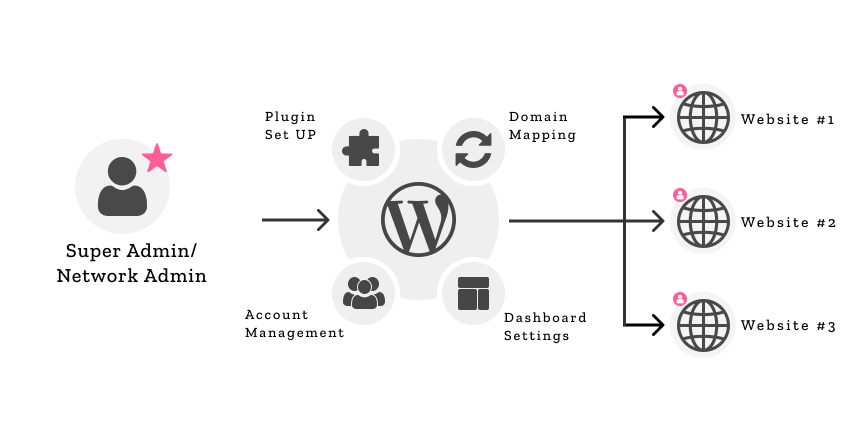
As a web owner or developer of such a stack, everything may seem okay at the application level—while the stack’s server, in turn, is constantly getting bogged down.
Related: Why Your WordPress Multisite Is Slowing Down — and How CPU-Optimized Hosting Can Fix It
Before CoPilot, trying to diagnose and fix such phantom issues could have taken endless documentation dives, rummaging through Google or Open Stack, and you’d often still not find a fix.
Why? You couldn’t be sure of what’s the actual problem, what’s causing it, and the specific tenets of your tech stack that would necessitate applying a fix in a certain way. In essence, you’d be lacking the information and tools you need to get the problem sorted.
CoPilot is custom-built to plug that exact gap. First, it can analyze your stack at both the server and application levels, learn what application or server settings may be currently applied, and see your site’s PHP logs; and then tap on Cloudways’ documentation, knowledge on the web, and its own experience to help you gain insights on the what, when, where, and how to fix it—imagine that.
Consequently, you’ll no longer have to always try and keep an eye on everything—your WP dashboard, your database, your cache, your server’s dashboard, and PHP and sever logs, etc.—while still trying to optimize WordPress for speed, user experience, and SEO.
As we saw in a previous article, Cloudways not only gives you the tools, choice, and flexibility to truly optimize, but you now also have CoPilot to assist you while troubleshooting—bringing full-circle Cloudways’ commitment to ensuring an SMB like yours can truly scale, grow, and maximize ROI affordably.
Related: Easy and Quick WordPress Optimizations with One-Click and One-Plugin Solutions
Cloudways CoPilot vs. Hiring a DevOps Engineer
Compared to hiring a full-time DevOps Engineer (or web developer), you’d be getting much more technical ability, much deeper stack knowledge, and more powerful troubleshooting capabilities, at a fraction of the cost. Mind you, for the first 6 months of hosting your site on Cloudways, you’ll not be charged a cent for Cloudways CoPilot Credits. No!
You’ll get free credits to tap on the powerful troubleshooting agent free of charge, allowing you to unleash its power—and save endless hours you’d have spent solving issues.
Try Cloudways CoPilot for Free: Get 6-Month CoPilot Credits
PS: We may earn a small commission at no extra cost to you 🙂
Not only that, but you’ll also save on both server and staffing costs—as it will seamlessly do the job you’d have had to hire a DevOps engineer to do.
Your online business’s journey is like doing the Le Mans—with Cloudways CoPilot, you’ll have a co-driver seeing the corners (and hurdles) you’ll be too busy, too tired or too pre-occupied to see—and those few seconds saved could be the competitive edge you need.
Don’t take my word for it—here’s real customer proof of how Cloudways CoPilot has not only made troubleshooting easier, but also saved time and costs for businesses like yours.
5. Real Customer Proof of Cloudways CoPilot’s Time and Cost Savings, and Its Impact on Server Troubleshooting for SMBS
Now, I am not the only one who’s been impressed by how much time Cloudways CoPilot saves. A few agency owners and WordPress developers shared their experiences, and the pattern is quite clear—CoPilot is synonymous with increased host troubleshooting speeds and peace of mind.
Jonathan—Runs a Small WP Hosting Agency
Jonathan, who runs a 12-client WordPress agency, says Cloudways CoPilot saved him around 15 hours in a single month—simply by identifying PHP-FPM overloads before they could lead to slowdowns.
He’d recently on-boarded a popular LMS LearnDash site offering online classes to 1200 students every day. A plugin he’d installed specifically for that site, was running too many cron jobs (and too often), and CoPilot was able to notice that this resulted in PHP-FPM facing frequent overloads.
After timely identification of the issue and its cause, CoPilot suggested that Jonathan transition his WordPress Multisite from the hybrid stack to Cloudways Lightning stack; even providing a step-by-step guide on how to roll it out over the next month.
For the time being, CoPilot—working collaboratively with Jonathan—was able to find other areas in the WP multisite where the load on PHP-FPM could be offset, and consequently reduced.
Turns out that, if Jonathan turned off the Query Monitor plugin—whenever he was not using it, at least—and deactivated the plugin on all other sites except the main one (his admin site), he could compensate for the additional load on PHP-FPM since onboarding the new client.
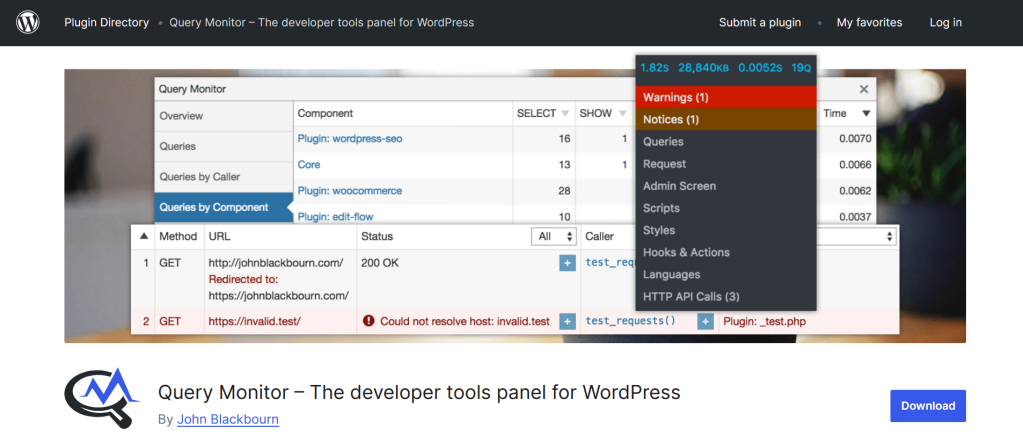
Essentially, thanks to partnering with CoPilot, Jonathan was able to solve a relatively complex bottleneck easily, superfast, and without needing to upgrade his 4GB server.
Yes, CoPilot suggested shifting from Cloudways hybrid stack to lightning stack—and even though Jonathan hadn’t been aware of how lightning stack could help him scale—he got a detailed step-by-step guide on how to couple site staging management and Cloudways server-cloning tools to slowly undertake the shift over the next month.

Cloudways servers come with a host of useful features and add-ons, and creating server clones—or upgrading/downgrading your server—can be done easily. With just a click of a button, moreover, you could shift from an AWS instance to a Digital Ocean High-Performance droplet, for instance, in a matter of minutes.
To alleviate his worries, CoPilot also did a breakdown and comparison of server costs between his current setup and the suggested High-Performance Server + Lightning Stack combination—a marginal server cost increase of 20% for more than a 70% increase in site speed.
Javid—Runs a WooCommerce Hosting Agency
Javid has spent the last decade running his own WooCommerce store. After endless Zoom calls with his acquaintances—tapping on the experience he’s gained over the years—he decided to start a WooCommerce hosting agency for small businesses; that he’s now been running for two years.
Juggling maintaining his own burgeoning Woo store, and managing his clients’ sites has been a handful for Javid, and he had not realized that his agency’s tech stack was facing a compatibility issue with the new WooCommerce DB table infrastructure.
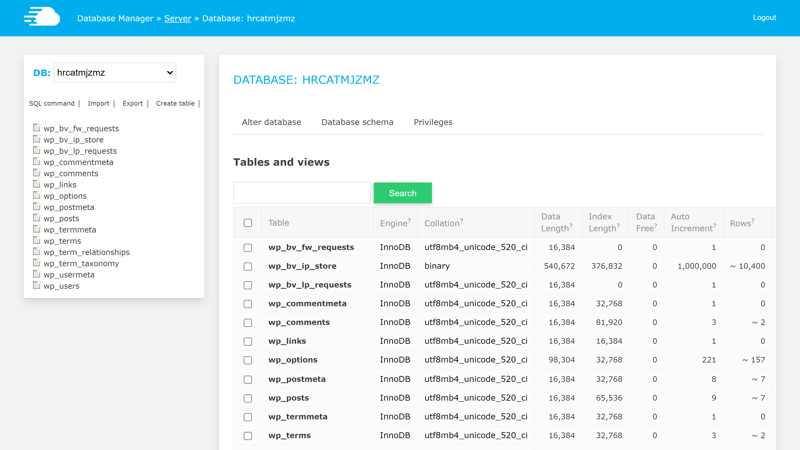
Essentially, most of the plugins his clients use and are conversant with require legacy compatibility—especially since WooCommerce shifted to a new way of creating and storing entries to the database (High-performance order storage).
Cloudways CoPilot caught the issue on his behalf and, thankfully, way before any client sites could experience downtime.
From a troubleshooting perspective, WooCommerce can be quite sensitive, especially since it requires numerous integrations—including payment systems and plugins—that could end up breaking if troubleshooting is done wrong.
Therefore, CoPilot suggested that Javid first ensures backward compatibility by installing a ‘Legacy Compatibility’ extension for WooCommerce. Second, Javid would also need to enact a hybrid setup, where the application of the new WooCommerce DB infrastructure would be piloted in phases—and run along the legacy indexing method, initially.
Javid wasn’t sure how he would enact the latter, but CoPilot pointed out to an almost hidden setting in WooCommerce settings; under the ‘Advanced > Features’ section—as well as the ‘Advanced > Legacy API’ section—where he could check a tick box for enabling ‘WordPress posts storage (Legacy)’ and ‘Legacy REST API’ consecutively… This would tell WooCommerce to ensure backward compatibility to the previous DB approach, while ensuring new DB tables follow the new approach.
How to Enable Legacy Posts Storage and Legacy API (for Backwards Compatibility) on WooCommerce
Here’s a shortcut for a quick check on your setup:
— For Legacy API: ‘https://example.com/wp-admin/admin.php?page=wc-settings&tab=advanced§ion=legacy_api‘. Note that you may need to install and activate the ‘WooCommerce REST Legacy API Extension‘.
— For WordPress posts storage (Legacy): ‘https://example.com/wp-admin/admin.php?page=wc-settings&tab=advanced§ion=features’. This setting only works if the Legacy API setting is set correctly, and the extension installed and enabled. 😉
The alchemy of CoPilot though, was that it identified the issue in a very timely fashion—saving Javid the time, stress and headache he’d have had to go through; while dealing with clients sites that may have experienced downtime due to the issue. Gladly, they didn’t… phew!
Moreover, CoPilot saved Javid the hours he would have spent searching across the web for a plugin/tool—to allow legacy compatibility—that doesn’t exist. There’s no internet fix that would have worked, as there is none. What’s needed is to change a setting deep within WooCommerce settings, as noted earlier.
Thankfully, Javid had tried out CoPilot and was able to know that, and realize the existence of the issue—even before he’d discovered it himself or was aware that it was occurring—and before anything broke as a result. Simply life-saving! Dealing with concerned clients or trying to fix something you are not even aware of, can be such a mess.
The two are just good examples of how CoPilot can be useful in a real-world setting. There’s more:
Rodrigo, who runs a WP Multisite for his local network of Sports Magazines, calls it “having DevOps-level insight without paying DevOps-level salaries”. He’s super keen on keeping costs down, and with recent changes in Search, had to let go of a handful of his staff a few weeks earlier.
And Kim, a freelance developer, attested that with Cloudways CoPilot she resolves server issues in “2-3 minutes instead of 10”. Since she has over 180+ client sites that she manages, she knows that those few minutes can be priceless.
If you’ve ever spent your morning staring at CPU usage charts trying to figure out what went wrong on your stack, those numbers hit differently.
Cloudways CoPilot isn’t about showing off—it’s definitely not another ‘AI gimmick’—it’s about making those hours back… A Swiss penknife hands-on intelligent troubleshooter for delicate, custom fixes that dynamically adjusts to your stack, while still applying known and learnt fixes—against common server issues.
6. Who Is It For?: Businesses and Individuals That Could Benefit From Using Cloudways CoPilot Intelligent Troubleshooting Assistant
Small Businesses, Hosting Agencies, and Web Developers
If you’re like me, and you care for (or own) a WordPress/WooCommerce site on your own behalf (or on behalf of others), Cloudways CoPilot could make server troubleshooting magnitudes easier and way much faster.
If you run a Web Development Agency or work for one, Cloudways CoPilot could be just what you need to streamline your troubleshooting workflow.
Running a single site is one thing, but if you’re managing tens or even hundreds of sites, trying to optimize or troubleshoot stack issues is just an entirely new ballgame… It’s like trying to manage a kitchen that serves several restaurants. The same can be said for Small and Medium Businesses, SMBs.
The more sites you manage (especially via WP Multisite)—or on the same shared server (or resources), the more likely plugin conflicts, code changes, and intra-stack dependencies may cause server issues and performance bottlenecks.
Knowing how to monitor, diagnose, and fix these issues can be complex and is often such a time-consuming job, that it takes away from other roles and functions.
How Host Problems Force SMBs to Hire DevOps Engineers and Entire Web Development Teams—and How Cloudways CoPilot Can Help
The solution is often to hire dedicated DevOps engineers to offload that work, but the costs of hiring the right talent need not eat into your profitability. Not when Cloudways CoPilot can offload most of that work.
It’s about having that extra pair of eyes, that saved 10 minutes late at night; it’s about real solutions for real (specific) issues on a custom config. That’s what it’s about for me.
From our example earlier, Cloudways CoPilot is like having a kitchen manager who’s able to co-ordinate the kitchen to run at optimal levels—regardless of the number of restaurants it is serving.
Think about it, if you could run a hundred more sites and rest assured that any issues that may arise could be sorted in a timely, professional manner, what’s stopping you from scaling your business and maximizing ROI?
I mean, you not only get to alleviate the cost of hiring a dedicated DevOps engineer or web developer, but more importantly, you also get the scalability to grow your business exponentially.
An agency web stack that works for 100 sites today should be able to handle double the number of client sites, with the right tech and tools for troubleshooting—Cloudways CoPilot is just that.
Solo Entrepreneurs and Freelance WordPress Developers
On the other hand, you could be a solo entrepreneur doing your thing and running a web stack for yourself—just doing your thing. You stand to benefit from CoPilot too… As would a freelance developer;
Imagine being able to couple your development knowledge and experience with a tool that has deep-integration with the server beyond what you can see yourself.
Think about it, wouldn’t you be able to work faster, way more efficiently, and less stress-free if you had an encyclopedia of your own tech stack? Yes, that’s what I thought.
And I think that’s what best defines Cloudways CoPilot—an encyclopedia of your own WordPress/WooCommerce tech stack.
In my experience, it’s way more than the ‘AI that prevents your website from going down’—it’s a web development partner that bridges the gap of what you can’t know, don’t know, or wouldn’t be able to see on your stack, i.e., the second head in “two heads are better than one”, as the adage goes.
Try Cloudways CoPilot on Cloudways Flexible
7. Key Benefits Breakdown: What CoPilot on Cloudways Could Mean for Your Business
By now, I think we have a good idea of what CoPilot can do, technically speaking… maybe we should talk more of what it could mean for your business.
TL;DR: A Summary of Cloudways CoPilot Benefits
Here’s a quick breakdown of the key benefits of Cloudways CoPilot, the Intelligent Hands-On Troubleshooter available for Cloudways Flexible servers:
- Server issue detection and diagnosis in minutes: No more late night escapades into the unknown when it comes to server troubleshooting. CoPilot flags down issues that would otherwise lead to downtime, and pinpoints where the issue occurred, and what caused it.
- Actionable solutions for the identified issues: we have the what and the where; CoPilot then tells you the how—how to fix the issue. Additionally, you don’t just get alerts, you get actionable, clear, and well-put out fixes, including specific code fixes customized to fit your setup.
- Time Savings: As a web owner, e-Commerce business manager, or a web developer, your time could be better spent beyond troubleshooting and optimization. You could be resolving server problems much faster—customers report 50-75% faster resolution when using Cloudways CoPilot.
- Cost Efficiency: With CoPilot, you won’t need to hire DevOps engineers. Forget the associated hiring costs too, and welcome a capable 24/7 troubleshooting helper, for all your server and application issues. Did I say you will save a bucket load?
- Peace of Mind: Yes. Take a deep breath in…now breathe out… aaah :0… No stress; no endless scrolling on Search Engines. Those days are gone! Welcome to Cloudways CoPilot and realize the benefit of a truly intelligent assistant for all your server troubleshooting needs—never mind the size of your server, the complexity of the issue, or the time of day/night it occurs. CoPilot is always-on and yes, it will be there with you every step of the troubleshooting way 🙂
Now that we’re done with the TL;DR, let’s talk of real-world experience using Cloudways CoPilot, and expound on these benefits.
Real-World Benefits of Using Cloudways CoPilot
(a) Server Problems Detection & Detailed Diagnosis in Minutes
Most monitoring tools would just stop at ‘hey, something’s wrong with your database’—not CoPilot. If MySQL is overloading on your stack, it won’t just tell you the process ‘spiked’—it will show you the specific queries responsible for that spike.
For instance, I had a merch WooCommerce store that would always lag every time I added a new product—for some reason. I never really understood why until I started using CoPilot, which not only identified the issue but also went a step further—and told me what’s wrong and why.
The intelligent always-on troubleshooter on my Cloudways server flagged a database bottleneck, and in good detail, explained that there was a specific table index that was missing. Moreover, CoPilot even offered the exact SQL command that I’d need to fix it.
That’s the difference between endless hours of trial and error—which is exactly the kind of thing you should never do, especially with the WooCommerce database—and a quick, efficient, proven solution.
Even more, thanks to the intuitiveness of Cloudways’ server dashboard and interface—and the fact that you can access your DB in a secure environment—getting my issue solved was as simple as ‘Ctrl + C’ and ‘Ctrl + V’… need I say more?
Do the same for our discount code below and get to enjoy the benefits of using CoPilot on Cloudways. 😉
You can get a 20% Cloudways Discount by using our promo code ‘MANIAINC‘. We may get a commission when you do or when you get a Cloudways plan via one of our links.
Related: 5 Reasons Why Your Website Needs Managed Cloud Hosting (and Why We Think Cloudways is the Best)
(b) Actionable Solutions for Server Issues
The one thing that Cloudways CoPilot is limited in is…wait for it… BS. It doesn’t send you to the moon to collect a Mars rock sample. Never! CoPilot won’t leave you guessing. Every issue alert is much more—it comes with an explanation of what’s happening and a proven solution path.
Depending on what’s going down, it could give you a config/setting suggestion, a quick SmartFix, or even a customized-to-fit code snippet.
PS: Try SSH-ing into your server one day—thankfully you can with Cloudways—and you’ll get to meet ‘sudo -u root wp db repair – allow-root – skip-plugins’. What does that do? Haha… it’s alchemy…
Something simple like just a quick database repair feels like steering a spaceship, if you’re not conversant with server architecture—and yes, a simple DB repair that was.
You wouldn’t need to have to know that with CoPilot; let the tech do the work for you. 😉
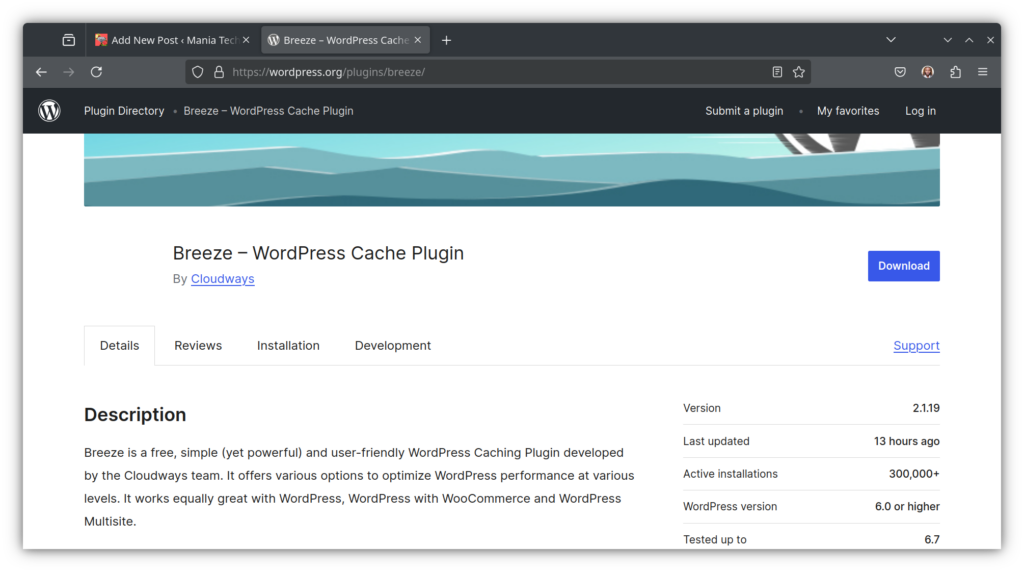
CoPilot won’t tell you to just ‘clear cache’, for instance—it tells you which cache (Varnish or Redis or Breeze Cache), why it matters, and what to do next.
(c) Time Savings
WordPress developers who use Cloudways CoPilot report fixing issues 50-75% faster
—almost twice as fast. For freelancers and agency owners, that’s not just ‘convenience’—it is extra billable hours that’d have gone with a DevOp, or more projects (and clients) you could actually take on.
A good way to put what it’s like using Cloudways CoPilot is that: it is like having a second pair of eyes that are always awake, always keeping an eye on your stack, and always a step ahead.
(d) Cost Efficiency as Compared to Hiring a Developer
Hiring a full-time DevOps engineer to monitor multiple
(custom-configured) sites is not cheap. CoPilot bridges that gap by giving you expert-level diagnostics at a fraction of the cost.
Not only that, but you also retain 100% control of what fixes are applied where, and also the guidance and collaboration for brainstorming, choosing approaches to fixes, optimizing your stack, e.t.c—whenever you need it.
(e) Peace of Mind and Stress-Free Server Health Insights
Personally, I feel like peace of mind is the most underrated part of what CoPilot can do for you. Knowing that a digital, always-on, super-intelligent piece of tech is keeping an eye on things (on my Cloudways server) means that I can log off and take a weekend off—free of server alerts and only with actionable diagnostics, if any.
Moreover, it also means that I can actually focus on growing my business instead of spending most of my time firefighting; as can you.
Need I tell you how I learnt about that ‘sudo’ command I shared earlier? Do I tell you the endless hours spent on search engines that would have taken, or the many reCAPTCHAs I would’ve had to hoop through? Let’s not even start with AI Overviews… If you’ve been there, you know what CoPilot could mean for you and your business.
Let me put it this way, Cloudways CoPilot is that quiet safety net that you did not know you needed, until you finally stopped worrying about what could go wrong on your host.
There’s also a story of why I know Google PageSpeed Insights is on pagespeed.web.dev, and I told it in the form of a previous article delving deep into Mastering Server-level WordPress Optimizations.
Read it, and hopefully get your site to a point where you don’t have to constantly do LCP, and Core Web Vitals checks endlessly… Who knew a few hundred milliseconds could be so hard to stave off?!
Your online business’s journey is like doing the Le Mans—with Cloudways CoPilot, you’ll have a co-driver seeing the corners (and hurdles) you’ll be too busy, too tired or too pre-occupied to see—and those few seconds saved could be the competitive edge you need.
Related: Mastering Server-Level WordPress Optimizations: Proven Strategies for Blazing-Fast Performance
8. Why Cloudways CoPilot?: Why It’s Useful for Small and Medium Businesses, Developers and Freelancers
If you’ve followed our WordPress Guides and Tutorials 2025 Series, you have an idea of what you get by simply moving over to Cloudways—and you’re probably already a customer.
If that’s the case, Cloudways CoPilot is worth giving a try—especially if you’ve ever lost a few hours chasing down a seemingly phantom issue, that could have been solved in just a few minutes.
Whether you’re just starting out and getting to learn the nuances and complexities of WordPress and WooCommerce, or you’re an experienced solopreneur or WordPress developer, CoPilot could be that edge you need, to up your server troubleshooting game.
It’s not easy to know what’s happening on your web stack—especially deep within PHP and its modules, or on the WP database… Yes, you may have access to a couple charts here and there—telling you a few details about CPU Usage—or even a tool sending you server alerts.
I dare say, however, that you deserve better—you deserve more than just alerts, you deserve a troubleshooting partner whose timeliness, intelligence, and scope of knowledge, you can rely on.
You deserve to discover server problems before they cause downtime; and you deserve a web host who allows you the choice, flexibility, and tools to truly customize your WordPress tech stack—as per your needs, preferences, and business goals. You deserve a host who gives you the power to scale, grow, and maximize your business’ ROI—while keeping costs affordable.
Watch below how one agency leverages Cloudways CoPilot to help optimize their host troubleshooting workflow. Courtesy of Cloudways on YT.
It’s easy to think that maybe you need a bigger server to prevent frequent memory max-outs for your disk. It’s more nuanced than that. How would you tell if it is PHP-FPM that’s causing the issue? It could be a backups plugins storing huge backups on the server’s disk, for instance.
It could even be heavy concurrent usage that’s throttling processing memory on your stack. With Cloudways CoPilot, you get deep insights into your custom setup, and you’ll know the what, where, when, and most importantly: how to fix it.

You’ll not only save on time, but also on the costs of hiring DevOps engineers. I mean, can you really compare a $10 added-cost to the cost of hiring a developer or DevOps Engineer full-time?
I’d argue that even just the peace of mind—that comes with knowing there’s 24/7 server health monitoring for your web stack—is worth much more than any additional CoPilot costs incurred.
Some things, money can’t buy; and chief amongst those is your time. Why not save hours on end that would have gone to firefighting server issues; and use that time to grow your business, write a blog/news article, or even promote your WooCommerce store more efficiently?
Try Cloudways CoPilot For Free
You can get a 20% Cloudways Discount by using our promo code ‘MANIAINC‘. We may get a commission when you do or when you get a Cloudways plan via one of our links.
My Experience: Why I Would Recommend Cloudways CoPilot
In my experience using Cloudways CoPilot, not only did I save time—thanks to troubleshooting happening 50-75% faster—I was also able to gain in-depth insight into my web stack. Moreover, CoPilot alleviated the anxiety and stress of always wondering what’s going on with the site.
Gone are the days of constant host dashboard checks. If and when there’s an issue, it’ll take me just a few mins to get it sorted—no matter its complexity.
For me, that’s power that’s priceless—and with the fact that Cloudways will give each and every new server (on their Flexible plan) 6 months of Free CoPilot Credits—it’s really not even a question of costs, or AI; it’s about utility.
It’s about having that extra pair of eyes, that saved 10 minutes late at night; it’s about real solutions for real (specific) issues on a custom config. That’s what it’s about for me.
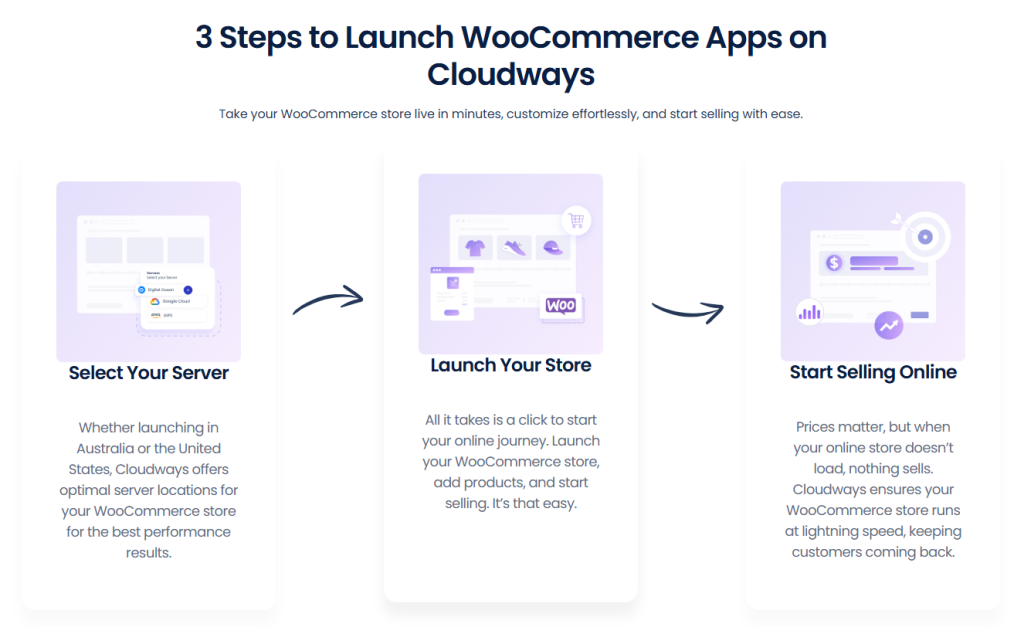
Cloudways is currently offering CoPilot credits for Free for the next 6 months—all through the rest of 2025 to January 31, 2026—so you can try out the hands-on troubleshooting tool, and see what utility it can bring into your workflow. No credit cards needed—just spin up a test server right now, and let CoPilot show you what it can do.
Get 6 Months of Free CoPilot Credits
In a WP-technology landscape where server management can feel like a never-ending checklist, and where speed and user experience could make or break your business, tools like Cloudways CoPilot are indispensable—they are the quiet assistants that will help you stay ahead of the curve. Not flashy. Not intrusive… Just genuinely useful!
Related: Get Reliable Cloud Hosting from Cloudways – Our Recommendation
I’ll sum up by giving you a challenge ;0
Head on to Cloudways and give CoPilot a try. Break something on purpose (maybe delete a few entries from the database of a default WordPress template site), and see how quickly—and accurately—Cloudways CoPilot points you in the right direction.
Once you’re done, let us know in the comments what your experience was—it could help someone else facing similar bottlenecks. You might also just find yourself troubleshooting less—and building more.
It’s as simple as:
Server Issue Detected (Timely, & Before Downtime) → Deep Issue Diagnosis (with Deep Stack Insights) → Proven Fix or Fix Suggestion (with Issue Recurrence Prevention Mechanisms added)
How to Get Free Cloudways CoPilot Credits for the Next 6 Months
Explore Cloudways CoPilot with Free 6-Month Credits on Cloudways—and do a fun test; like timing how long it takes you to solve an issue manually, compared to using CoPilot.
Facing plugin issues? No more deactivating all plugins just to find a troublesome one. Why don’t you try it for yourself and discover how CoPilot helps during plugin conflicts?
It’s why I stopped Googling error codes or relying on ChatGPT for delicate fixes, on my custom web stack config… Some things are too precious to just leave to general knowledge.
Try the ‘Manual vs. CoPilot Troubleshooting—10 minutes vs. 2 minutes’ challenge for yourself… We’ll post your results here… Cheers. 😉
Test Cloudways CoPilot with a Cloudways Free-Trial right now!
PS: Let us know the results in the comments below, and we’ll post a few here… Happy Troubleshooting! 😉
You can get a 20% Cloudways Discount by using our promo code ‘MANIAINC‘. We may get a commission when you do or when you get a Cloudways plan via one of our links.
More from Mania Africa:
 Maximize ROI for your SMB Website with Cloudways’ CPU-Optimized Servers + Lightning Stack: Scale for Long-term Growth at an Affordable Price
  Easy and Quick WordPress Optimizations with One-Click and One-Plugin Solutions
  5 Reasons Why Your Website Needs Managed Cloud Hosting (and Why We Think Cloudways is the Best)