


Contents
- 0.1 RelatedPosts
- 0.2 All You Need to Know About Seedance 2.0: ByteDance’s Next-Gen AI Video Model
- 0.3 Why Users Are Rallying to #Keep4o: The Social Backlash Against OpenAI Retiring ChatGPT 4o
- 0.4 To the Moon?: Is Bitcoin a Balloon in Space or a Building on a Solid Rock Foundation – A Practical, Hype-Free Look at the Feb 2026 Bitcoin Crash
- 1 2) The 3 WordPress Caching Layers
- 2 3) WordPress Caching Application Layer Deep Dive — Breeze + Redis/Object Cache Pro
- 3 4) Server Layer for WordPress Caching Deep Dive — Varnish + Lightning Stack + PHP-FPM
- 4 5) Edge Layer WordPress Caching Deep Dive — Cloudflare Enterprise
- 5 6) Unified Cloudways Caching Ecosystem — How the 3 Layers of Cloudflare Caching Interact
- 6 7) Real-World Results—How WordPress Caching is Improved on Cloudways
- 7 8) Getting Started with Server Caching on Cloudways
- 8 9) Monitoring and Troubleshooting
- 9 11) Conclusion: Why Leveraging Caching is Important for your WordPress Site
Caching is the internet’s short-term memory. Instead of making the server re-cook every single page on every single visit, caching ensures that websites keep ready-to-serve copies—a simple change which, alone, can transform sluggish WordPress installs into sites that feel alive.
By definition, caching is the process of storing frequently accessed web data in fast, temporary storage (the cache) ensuring speedy delivery for subsequent requests.
At its crux, #caching is mostly composed of three collaborating layers: the application layer (page caching + object caching), the server layer (Varnish or Memcached), and edge caching (effected via a CDN such as Cloudflare).
As a WordPress site owner, creator, freelance developer, or SMB, dealing with server-side caching can be quite taxing, especially when you lack the tools to effectively tweak your stack for maximum performance. Even so, server-side caching can be one of the most impactful stack points. One that you can leverage in ensuring huge leaps in site performance, better user experience, and meeting the needs of your readers (or customers).
In this article, we’ll look into the various ways of turbo-boosting server-side caching on your WordPress/WooCommerce site. We’ll explain what configs/approaches have worked for us, and introduce you to a powerful server-caching combination—that will ensure that you can marry all 3 layers of #WordPressCaching for the ultimate performance of your site/business.
Beyond that, we’ll share how, after trying dozens of hosts and stacks, we landed on Cloudways as the ultimate cloud hosting platform, and how it stitches the three caching layers into a single manageable, pre-tuned platform.

2) The 3 WordPress Caching Layers
As shared earlier, WordPress caching is composed of three layers: the application layer, server layer, and the edge cache layer. Whenever a user requests a page from your WP website, their request is routed through these layers as follows:
Browser -> Edge (Cloudflare) -> Server (Varnish -> Nginx/Apache -> PHP-FPM) -> Redis/Object Caching / DB
1. The Application Layer
The application layer of WordPress caching is responsible for caching rendered pages at the WordPress level, as well as caching database queries
(or PHP objects) using object caching. This is done via a cache plugin, which interfaces with object caching if available, to ensure that cached versions of your site’s pages are delivered—on subsequent requests. Essentially, if and when the same resources are requested again.
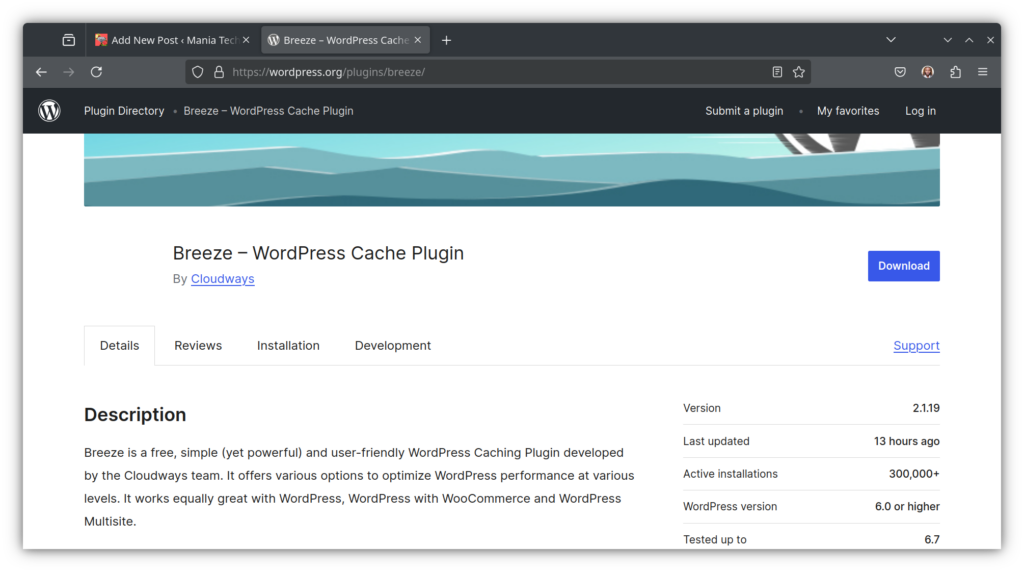
On Cloudways, our web-host of choice, caching happens at the WordPress level via their powerful Breeze cache plugin. The plugin is responsible for identifying frequent requests (such as home page fetches), producing a cache of that page, and then ensuring it is delivered on subsequent requests—without necessarily hitting the database each time.
Think of it this way, user A visits a page, loves it so much that they share it with their friends: users B and C. These users also share the page with their friends: users D, and E. The Breeze plugin will recognize the need for the page to be cached—as it is receiving frequent requests—and will go ahead to produce a cache of that page.
As a result, any subsequent user of that page (Ideally starting with user B in our example) will receive the cached version of the page, saving the web stack the processing that would be required for a data-retrieval trip to the database. Ideally, you should set your page cache plugin to not only cache pages and objects after the first request—but also pre-warm the cache in anticipation of access.
Pre-warming the cache is essentially simulating user requests—triggering the creation of caches for those pages; in anticipation of usage.
For instance, in the eve of a huge sale on a WooCommerce store, it is advisable to pre-warm the cache, and ensure that when the traffic trickles in, users will experience enhanced page load speeds.
Related: How to Optimize WooCommerce for Speed and Security
With the right setup, page caching can be the easiest win—as it serves pre-rendered HTML and keeps PHP and MySQL out of the loop—for most users.
Caching at the application level is nuanced, however, as your page cache plugin of choice needs the ability and capability to interface efficiently with your server—to ensure that caching works correctly. This way, caching can also have a huge impact on turbo-boosting user response speeds.
Cloudways have thought this through, and introduced a custom page caching plugin, Breeze. The purpose of this plugin is to ensure that caching happens optimally for sites hosted on their platform.

How?
The Breeze plugin is specifically built for their servers.
Breeze is powerful, to say the least, and includes a host of features, including page caching, database management, CSS, HTML, and JavaScript minification, and so much more. More importantly, it works optimally with their plethora of cloud servers, and integrates with object caching effectively.
You can read more on how to set up the Breeze Caching Plugin.
Cloudways have gone a step further and provide any and all servers on their platform with Redis Pro Object caching—entirely for free. Not only are you getting strong capable servers, a set-and-forget page caching plugin, you also get to enjoy the benefits of professional object caching with Redis Pro.

By definition, object caching is a server-side technique that stores frequent database objects—such as the results of frequent DB queries—in memory; allowing faster results for subsequent queries.
2. The Server Layer of WordPress Caching
The server-layer of WordPress caching is more-or-less the gatekeeper, and sits in front of the web-server, serving full pages from memory
. It can be effected via Memcached or Varnish—as is the case on Cloudways.
On Cloudways servers, Varnish is the gatekeeper; if it knows the page, it answers with cached HTML immediately—with PHP never running for that request.

I cannot emphasize enough how powerful that is in terms of performance.A normal uncached web request would be handled via PHP
. The request would be routed to the DB (let’s call it ‘PHP pre-processing’), a query result returned, and then PHP undertakes ‘post-processing’, and routes the result back to the user.
This process can take anywhere from a few milliseconds to as long as a minute—depending on the actual speed and power of your server.
With server-caching, however, and on a kitted-out host like Cloudways, a similar request wouldn’t require any PHP processing at all—requests would be served instantly, from the Varnish cache.
Beyond the obvious performance benefits, Cloudways have also introduced Lightning Stack, which can be coupled with premium CPU-Optimized or High-Performance cloud droplets.
This combination—CPU-Optimized/High-Performance servers + Lightning stack (Nginx + Apache + Varnish + PHP-FPM)—further turbo-boosts performance. This is by ensuring that your site not only has the best performance oriented tech, but also the capacity and capability to handle high concurrent usage—and do it reliably.
Think of a LearnDash LMS site where thousands of students are taking a test at the same time.
Studies indicate that sites using lightning stack can experience faster page loading speeds by as much as 75%. Imagine that.
You can read more on how to Maximize ROI via this combination.
The beauty of Cloudways, moreover, is that you don’t have to worry about configuring Varnish, or tweaking page caching to accommodate it. All you have to do is install the Breeze cache plugin, and the interface between page caching and server-caching is completely taken care of for you.
Do note that you can either use Varnish or Memcached as your server cache, and it is not advisable (or even possible) to use both.
3. The Edge Caching Layer
Edge caching is caching done via edge servers, a feature of Content Delivery Networks, CDNs
. One such CDN is Cloudflare, where copies of your pages are stored in servers all over the world (edge servers).
Whenever a user requests a page or resource from your website, it is delivered from the edge server nearest to them. Needless to say, this can elicit huge gains in page speeds; as the data would only have to travel far less distance, as compared to all requests going to the origin server.
Edge caching makes your site load quickly from Singapore to San Francisco—it’s where CDN meets global scale.

With Cloudways, you get to experience an Enterprise-level CDN at SMB costs—thanks to the Cloudflare Enterprise Add-on, which is heavily discounted at less than $10.
Mind you, the standard Cloudflare Enterprise plan—when bought directly from the company—will set you back a few thousand dollars every year… Imagine that.
Cloudflare Enterprise caches closer to visitors, and adds latency improvements. It also comes with hugely crucial features such as Polish, Brotli, Argo Smart Routing, a Web Application Firewall (WAF), and Edge Page Caching. We’ll discuss this in detail below.
When set up correctly, edge caching adds another powerful layer of caching, on top of page caching—handled by the Breeze by Cloudways plugin.
3) WordPress Caching Application Layer Deep Dive — Breeze + Redis/Object Cache Pro
Now that we understand what the several layers of WordPress caching are, we can now delve deep into each layer—starting with the Application Layer.
We’ll use our setup on Cloudways as a point of reference, and share our experience configuring and managing WordPress caching on their tech stack.
On Cloudways, the application layer of WP caching comprises the Breeze plugin and Redis Pro, our enterprise-grade object cache. Let’s look into each.
Breeze is a WordPress page cache plugin that also handles script minification, has browser cache controls, and an integration to purge the Varnish server cache—on Cloudways. Let me explain.
We earlier said that the page cache handles caching at the WordPress/WooCommerce level—ensuring that pages are stored in temporary storage (cache), so that these copies can be the one to be delivered for subsequent requests—without the need for PHP processing and retrieval from the database.
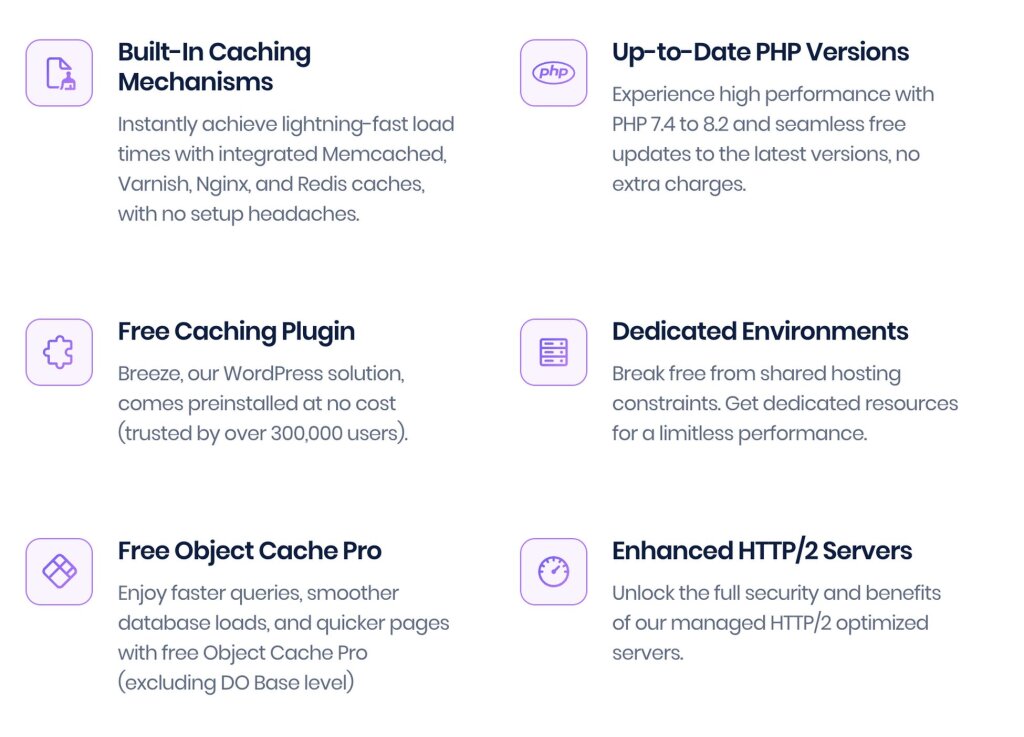
The Breeze plugin by Cloudways is, however, much more than just a page cache. It has deep integration with Cloudways’ servers and is specifically built to be compatible with Varnish, the server-level cache we use.
Breeze Cache Plugin Features
The plugin also has additional features as follows.
- DB manipulation features that allow you to clean up and optimize your WP/Woo database.
- Support for Heartbeat API; which provides a communication protocol (that uses AJAX calls) between your WP site and the server.
- Script minification and optimization features; that allow you to minify, inline or combine the CSS, HTML, or JavaScript on your site(s).
Script minification is super important when it comes to page speed, and ensuring that your users won’t wait long for pages to load. Moreover, it also helps a lot with SEO, as search engines rank fast websites higher. - Controls for the browser cache. This is a big one, as you’d normally need to install a whole other plugin to be able to control how your pages are cached at the browser level for your users—i.e., on the browsers they use. This setup can also be quite complex, especially if you lack the technical know-how.
- Native integration with Varnish on Cloudways. Since the Breeze plugin is custom-built for Cloudways’ servers—even though any site can use it—you get to enjoy ease when it comes to purging your server’s Varnish cache.
Breeze allows you to purge Varnish right from your WP dashboard.
Not only that, Breeze will also purge Varnish automatically whenever you make updates to your posts or pages.
Troubleshooting WP Application Layer Caching Issues—with Cloudways CoPilot
It is also important to mention that Cloudways also recently introduced ‘Cloudways CoPilot’, a hands-on intelligent troubleshooting assistant that’s powered by #AI.

As such, for something like configuring controls for the browser cache, CoPilot on Cloudways can come in very handy, to help you tweak the controls specifically, for your custom setup.
Beyond that, Cloudways CoPilot will always be on, monitoring the health of your server, and identifying any issues before they cause downtime.
The magic of CoPilot is that it doesn’t just tell you that something has gone awry. CoPilot not only shows you what’s causing the issue, but also suggests how you can fix it—with code snippets.
Even better, it has a feature called CoPilot ‘SmartFix’, which is a one-click solution to the particular issue you are experiencing. For instance, maybe you are experiencing a disk-full issue.
CoPilot will recognize the issue, tell you why it is happening, what caused it, and recommend fixes; including a SmartFix—which could be something like clearing old backups from your disk. All from the click of a single button!
Try Cloudways CoPilot for Free: Get 6-Month CoPilot Credits
PS: We may earn a small commission at no extra cost to you 🙂
Additional Helpful Features on Cloudways that Bolster WordPress Caching and Site Performance
A Robust Backup Infrastructure
Mind you, disk exhaustion is very rare on Cloudways servers due to their robust backup infrastructure—that allows you to schedule backups at both the application and server levels.
Even more, Cloudways allows you to either back up your entire application (WordPress, WooCommerce, or LearnDash, etc.) or your entire server (with however many applications of different kinds) to your server’s disk; or to a remote backup location that they offer for free. Yes, you get remote backups at no extra charge!
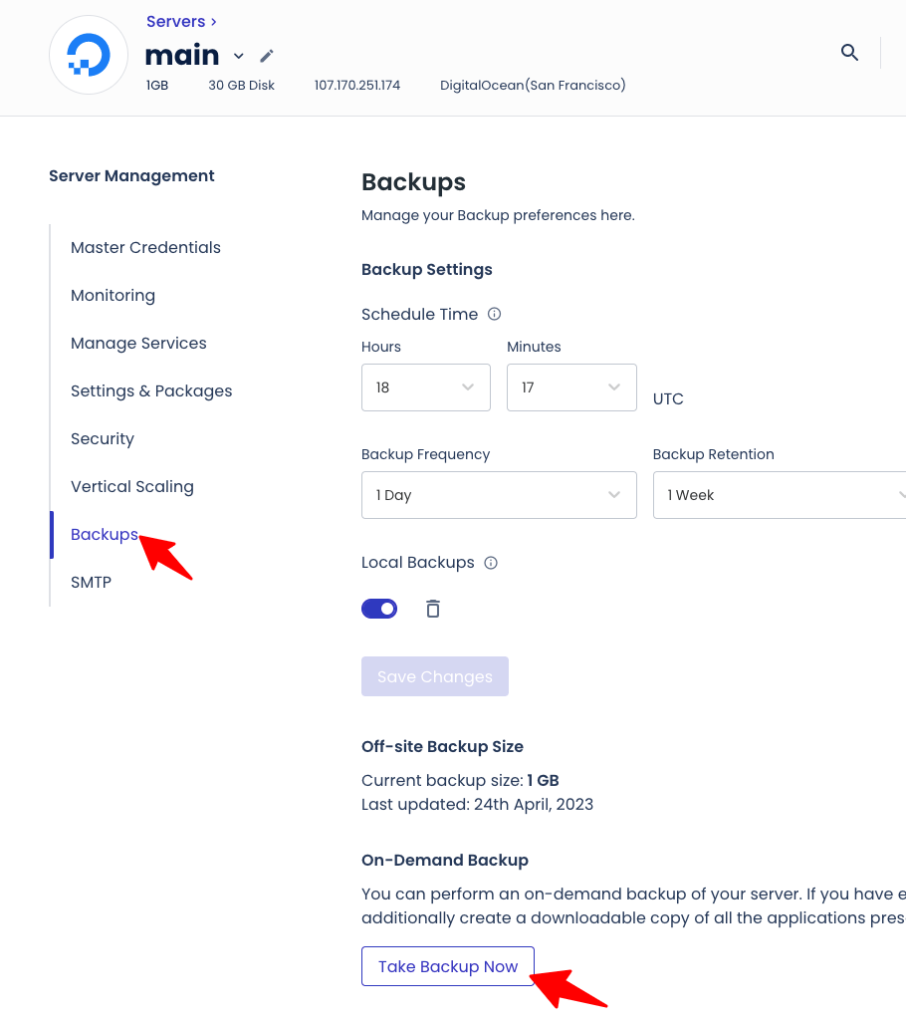
Consequently, no matter how many backups you have, you won’t need to give up your disk’s storage space to keep them. You also generally won’t need to rely on backups as much—thanks to site staging features on Cloudways—available free of charge for all Cloudways servers. Simply amazing!!!
Industry-Best WordPress Site Staging Management on Cloudways
Cloudways have an industry-best site-staging feature that allows you to do development work on a staged copy of your production site
. Therefore, whenever you need to make changes or test plugins, you can easily copy over your production site—via their staging management platform—work on that copy, and then push over those changes to the production site; all at the click of a button… literally a pull and push button for staged versions of your site. Incredible… phew…
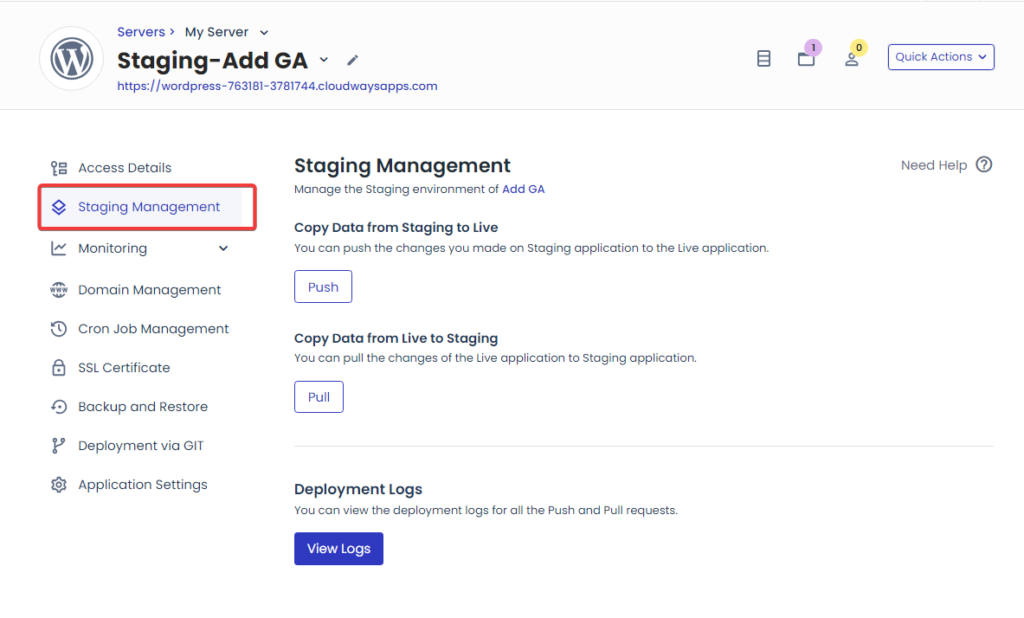
Making mods on your WP site often leads to crashes, but with Cloudways, you don’t have to risk or experience any downtime—as you have the capability to test new features, plugins, or modifications on a staged copy of your production site.
Moreover, you can also enjoy the usefulness of Cloudways CoPilot to explain what is causing issues, and help mitigate any issues you may face while testing or trying to make modifications.
Most WordPress web hosts don’t even offer site staging features of any kind (or a robust backup infrastructure), but Cloudways does… and that’s why they are the best cloud host for an SMB like yours.
Check out Cloudways’ plans, and find one that suits your needs.
You can get a 20% Cloudways Discount by using our promo code ‘MANIAINC‘. We may get a commission when you do or when you get a Cloudways plan via one of our links.
Redis Pro Object Cache
Redis Object Cache Pro
stores frequent database query results (and PHP objects) in memory, ensuring they are delivered instantly from the cache—and not refetched from the database each time they are requested.
As a result, DB requests get responses way faster, especially in sites with thousands-long catalogues—or WooCommerce stores with huge product databases—that may otherwise weigh down the server.
Using the Redis Pro object cache, product fetches will be turbo boosted, ensuring that your customers can search for and purchase products seamlessly.
The Pro version of Redis Object Caching is an enterprise-grade object caching tool and as we shared earlier, it is offered completely free on Cloudways for qualifying plans.
According to Cloudways, this add-on will save you at least $95 per month, just by virtue of having your site hosted on Cloudways.
In my experience, object caching can be a powerful addition to your tech stack, and it works even better when used alongside Elasticsearch.
Elasticsearch, or simply ES, is a distributed search engine that indexes all the posts, products, templates, etc., on your site, and facilitates speedy searches from the index—positing huge gains in database search speeds.
For instance, say you have a huge product DB on your Woo store.
A user may be looking for a product variant that isn’t readily available via the shop pages, and with Elasticsearch, a search that may have taken tens of seconds can be delivered almost instantaneously. With Cloudways, you also get Elasticsearch via an add-on—completely free of charge—and you can couple it with Redis Pro for enhanced database query speeds.
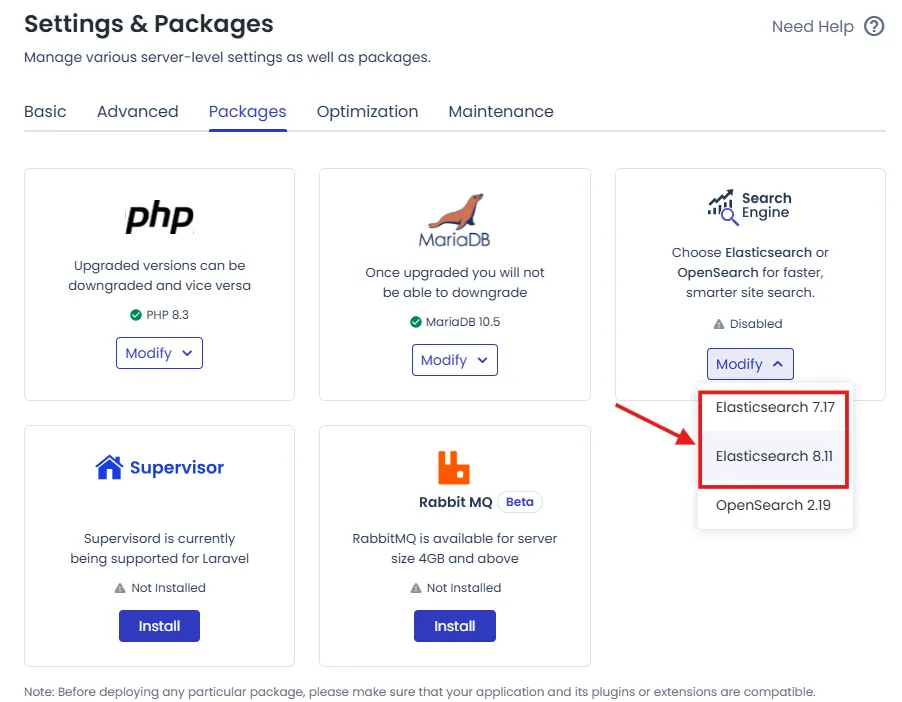
The beauty of this add-on—and the many others that Cloudways offers—is that you don’t need to handle their complex configurations yourself.
Cloudways does that for you; and deals with the complicated interfacing of something like ES with your server, and the ElasticSearch WordPress plugin (ElasticPress).
Get a Free Trial on Cloudways and test it out!
You can get a 20% Cloudways Discount by using our promo code ‘MANIAINC‘. We may get a commission when you do or when you get a Cloudways plan via one of our links.
How to Configure the Application Layer of WordPress Caching on Cloudways
Here’s a practical config checklist for the application caching layer on WP/WooCommerce:
- Install the Breeze plugin and enable page cache + browser cache + script minification (as per your needs). Then head to Cloudflare and enable GZIP/Brotli compression. Ensure that you set static files to long expiry. More guidance on how to install and configure Breeze is available in Cloudways’ Documentation.
- Enable Redis in the Cloudways server dashboard and install/configure the Object Cache Pro plugin, as per Cloudways’ instructions.
- Leave sessions and transients configured for Redis if you run an LMS LearnDash site or WooCommerce; but avoid caching dynamic pages—like cart and checkout—in full page caches. Sensitive cart/checkout fragments are already handled via Varnish/Edge Cache rules.
In simple terms, all you need to do is to turn on Breeze, flip Redis on—in the Cloudways server panel, enable Object Cache Pro in WordPress—and you’ll have taken care of the app caching layer for WP.
Breeze is the user-facing switch; Redis is the engine under the hood.
4) Server Layer for WordPress Caching Deep Dive — Varnish + Lightning Stack + PHP-FPM
The server layer for WordPress caching is where most of the magic happens.
Caching at the server level can be done either via Varnish or Memcached for WordPress/WooCommerce.
On Cloudways, Varnish is used and can be combined with the powerful Cloudways Lightning Stack and PHP-FPM—for maximum cache efficiency, efficacy, and performance.
At its core, Varnish is a high-speed HTTP reverse proxy that works by serving cached content from memory, accelerating delivery by factors. Varnish.org notes that it can speed delivery by about 300x–1000x, depending on the architecture where it is applied. You can watch the video below for a high-level illustration of how Varnish works.
On Cloudways’ web stack, Varnish sits between the Edge Cache and Nginx. During a cache miss, the request is routed as follows:
User request hits Cloudflare (edge) -> Cloudways’ Varnish (port 80) -> (miss) -> Nginx -> Apache -> PHP-FPM -> MySQL.
On a cache hit, however, Varnish returns the ‘on-memory’ copy of the page or resource—before PHP runs, and any additional processing is done.
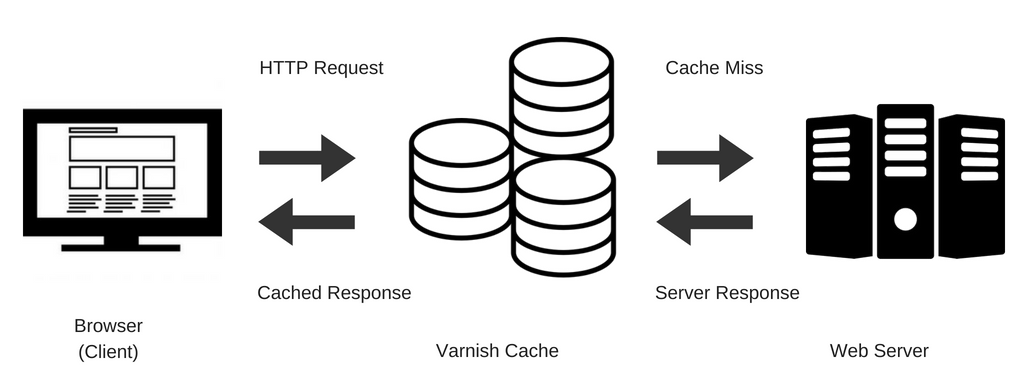
Think of it this way: Varnish is like an ATM. When you have a card (the server has a cached version of the page or a cache hit in our case), then you can just withdraw and be away with your money (the resource or page); without the need to enter the bank (PHP processing and ultimately, your site’s database), and queue in line waiting to be served.
But here’s the thing, Cloudways offers Varnish on both standard servers, running the hybrid stack, and now also on CPU-Optimized and High-Performance servers—which are coupled with Lightning Stack for Ultra-Fast performance.
Related: Mastering Server-Level WordPress Optimizations: Proven Strategies for Blazing-Fast Performance
Why Varnish Matters:
It reduces DB and PHP usage drastically, and can be especially impactful for documentation sites, high-traffic blogs, and static sections of e-commerce stores.
In terms of its interaction with LMS or WooCommerce sites, it is important to always ensure cache bypass for cart, checkout, and account pages. Such pages are commonly referred to as dynamic pages.
Cloudways are aware of the importance of these pages to your business, and their custom Varnish rules serve to protect them.
Even more, the Breeze plugin will automatically purge Varnish whenever content is updated. This way, users won’t be served stale content and miss out on crucial (and fresher) information such as product discounts, updated cart pages, or new LMS test flows.
How Cloudways Lightning Stack Bolsters Varnish Caching
When your site grows and is at a level where it is experiencing high concurrent usage, Cloudways’ Lightning Stack works to improve performance—by interfacing with Varnish at the server level to boost caching efficiency.
On Cloudways Lightning Stack, the roles of its various components are as follows:
- Nginx serves static files,
- Varnish caches pages (co-ordinating with breeze)
- Apache handles dynamic compatibility, and
- PHP-FPM executes PHP—very fast.
According to benchmarks, this set up can elicit page loading speed gains of up to 75%. Even more, both cached and uncached dynamic pages will load faster, as lightning stack shifts from the slower (traditional) PHP processing to Fast-CGI on PHP-FPM—which is much more performant.
When thousands of users are trying to purchase products on your Woo store (during a sale), these millisecond performance tweaks could mean better profits, and the maximization of your return on investment, ROI.
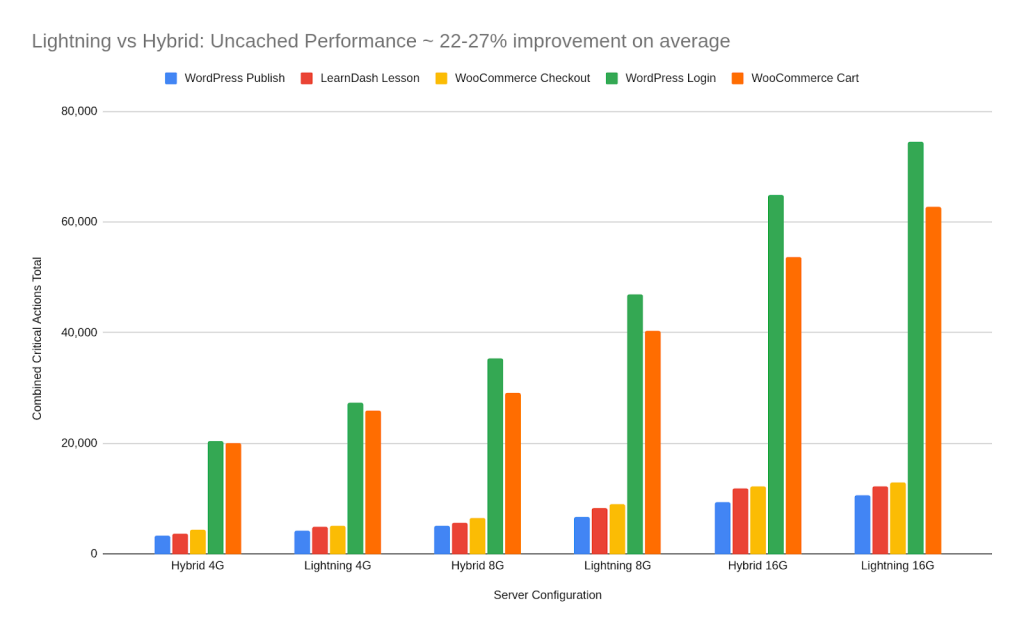
You, too, can draw all these benefits, simply by upgrading to the more powerful CPU-Optimized or High-Performance Cloudways servers.
You can get a 20% Cloudways Discount by using our promo code ‘MANIAINC‘. We may get a commission when you do or when you get a Cloudways plan via one of our links.
You can read more about maximizing your SMB’s ROI using High-Performance server droplets—and combining them with Lightning Stack on Cloudways.
For Cloudways, performance is key, and the team is dedicated to ensuring that you can effectively scale and grow your business—starting from a few sales a week to hundreds or even thousands of sales a month.
How to Configure the Server Cache Layer of WordPress Caching on Cloudways
For the best results, ensure you follow these best-practices for your Varnish config:
- Keep Varnish enabled for public pages—while ensuring that checkout, cart, and login pages are excluded. If you use the Breeze plugin, this will be handled for you automatically.
- For static assets, use longer time-to-live, TTLs, and for HTML, use shorter TTLs. Using Breeze, also ensure that you configure cache purges to happen automatically on post updates.
This can be especially helpful if you’re updating data feeds via an API—and/or when undertaking manual cache purges would be cumbersome (which is always in my opinion 😆). - Use tools such as pagespeedtest.org to measure both cached and uncached response times.
To ensure that users have a good experience, do not neglect uncached requests and always ensure response times for uncached requests (when cache misses occur) are optimal.
For instance, your site may have a very robust forum, and if users cannot effectively see newer posts or comments—or when these pages take forever to respond, user experiences may be impacted negatively. Consequently, this could end up dissuading visits or even purchases—in the case of an e-commerce store. - In terms of troubleshooting, if you see that stale content is being served on your site, ensure that Breeze is purging Varnish correctly.
A misconfiguration of Varnish could lead to a lot of confusion for both you and your users—some may see fresher pages and others may miss out on the performance gains of Varnish.
This is also true for instances where dynamic pages on your site are cached incorrectly—and if the issues persist, verify endpoint exclusions and also cookie rules in your Varnish rules.
Note also that you can use the Cloudways server dashboard to purge Varnish.
5) Edge Layer WordPress Caching Deep Dive — Cloudflare Enterprise
The best way to think of edge caching
, when it comes to WordPress caching layers, is as the icing on the cake of your caching setup.
At the end of the day, your pages can be fast, but will still have to travel all over the world to reach your global user base.
Edge caching is that last node (or the final messenger) that ensures these pages and resources are delivered on time, and as fast as possible (both in terms of page speed, processing latency, and page loading times).
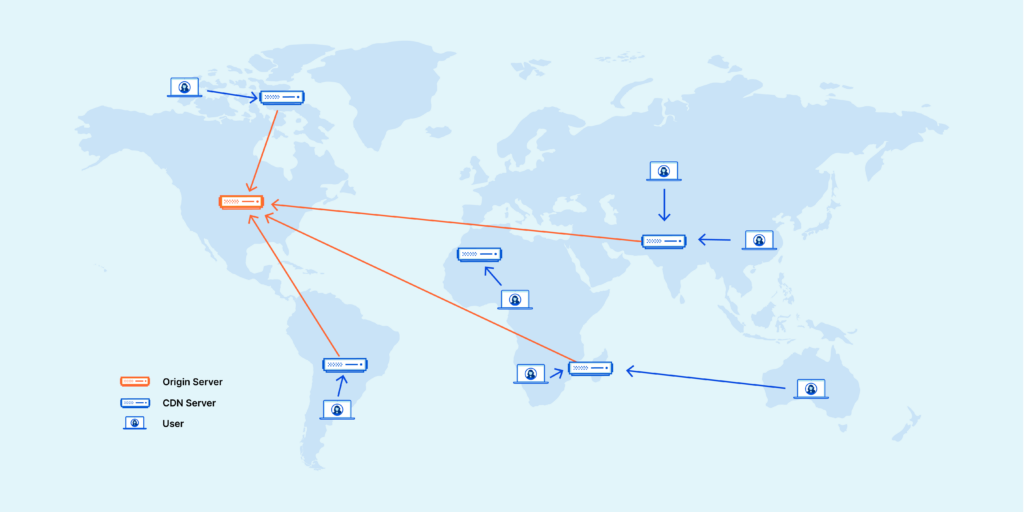
Thanks to the Cloudflare Enterprise add-on by Cloudways, your WP or Woo Store can enjoy enhanced edge caching. Cloudflare Enterprise provides the following enhancements:
- A global CDN that supports Edge page caching. Edge caching sits on top of the caching already happening at the application and server levels.
Traffic flows like this: Cloudflare Edge Cache -> Breeze Page Cache -> Varnish Cache on the server -> Object Caching -> DB—a total of four caching layers, all working to ensure ultimate performance for your stack.
Hypothetically, if each of these caching levels save processing times by at least 20%, then cumulatively, you’re looking at nearly 80% faster page loading times. - Argo Smart Routing; that enhances how traffic for your site is routed through Cloudflare. It works by optimizing the requests’ network path, which elicits gains in page speed, performance, and reliability.
Argo smart routing scans through Cloudflare’s network, and finds the least congested and fastest route—for delivering your edge cache assets to your users.
For instance, users in the global south (who are nearer to South Africa than Morocco), for instance, can have the site resources delivered to them via South Africa—instead of Morocco or the origin server, which may be situated in Europe or North America. - Brotli compression; that works on top of compression that Breeze already handles—to further lower resource sizes, ensuring faster delivery.
In essence, Brotli compression on Cloudflare uses a modern lossless compression to reduce the file sizes of web assets—CSS, JS and HTML—improving performance and reducing bandwidth usage.
What’s so crucial about bandwidth reduction—for instance—is that it ensures that no matter how big a product catalogue you have on your WooCommerce site, the page sizes, resource loads, and the cache files will not be too big also.
There’s no point doing all these mods just to have an overblown cache—the point of caching is to reduce the processing and server resources it will take for web assets to be delivered to users/customers. - Polish image optimization; that strips image metadata and applies both lossy and lossless compression to your site’s image files.
Polish also ensures that image attributes—like image dimensions (height and width)—are applied correctly on each image.
These attributes and their correct tagging is a common issue for numerous WP sites, especially when it comes to Large Contentful Paint, LCP.
LCP is one of the metrics that Google uses to rate site speed and user experience. You can measure LCP using PageSpeed Insights on pagespeed.web.dev. - The HTTP/3 Protocol; which is the latest HTTP protocol. It utilizes the QUIC transport layer protocol—instead of the older TCP protocol. QUIC is more secure, much faster, and less vulnerable to issues like packet loss—and even the infamous ‘head-of-line’ blocking issues; that can slow down connections.
- The Cloudflare Web Application Firewall, WAF. Perhaps the most crucial for site security, speed, and reliability, the Cloudflare WAF is the most useful of Cloudflare’s features for your site.
In practice, Cloudflare acts as a proxy that sits between the open web and your site.
This is hugely important as with the Cloudflare Firewall, any and all attacks can be caught and dealt with with, before reaching your site’s server.
On Cloudflare Enterprise, moreover, the WAF is super-enhanced, and allows you to tweak ‘Managed Security Rules’. These are, essentially, the most impactful security blocks that Cloudflare applies by default for all plans; but on Enterprise, you can tweak them. For example, you can tweak managed rules to ensure that parts of your stack (that may have been unintentionally blocked by the firewall) are unblocked.
Moreover, the WAF can also be enhanced by adding IP Lists—of sites to allow through the WAF, or to specifically block. - In-depth analytics. Cloudflare also offers in-depth analytics for page traffic, HTTP access, and resource usage—or even site crawling.
With Enterprise, you get custom analytics for everything—from who accesses your site, how often and from which IP.
Not only that, but you also get protection for your site’s resources. This can be effected through the WAF, or by applying other filters and blocks.
As such, not only is your site protected from attacks such as DDoS attacks, but you can also protect your site’s resources from things like hotlinking, or even AI scraping.
Hotlinking is where other sites use your site’s resources, taxing your server, and avoiding hosting the resources on their own servers—in a ploy to escape the server and bandwidth usage that would come with hosting those resources. - Cloudways also offers the Cloudflare Enterprise add-on with edge caching controls and routing priority. Your edge cache, for example, can be purged from the Cloudways server dashboard. Moreover, to ensure you can effectively debug cache-hit ratios, Cloudways also offers Cloudflare analytics for ‘origin vs. cache request’ breakdowns. You can read more about Cloudflare Enterprise on Cloudways in their documentation.
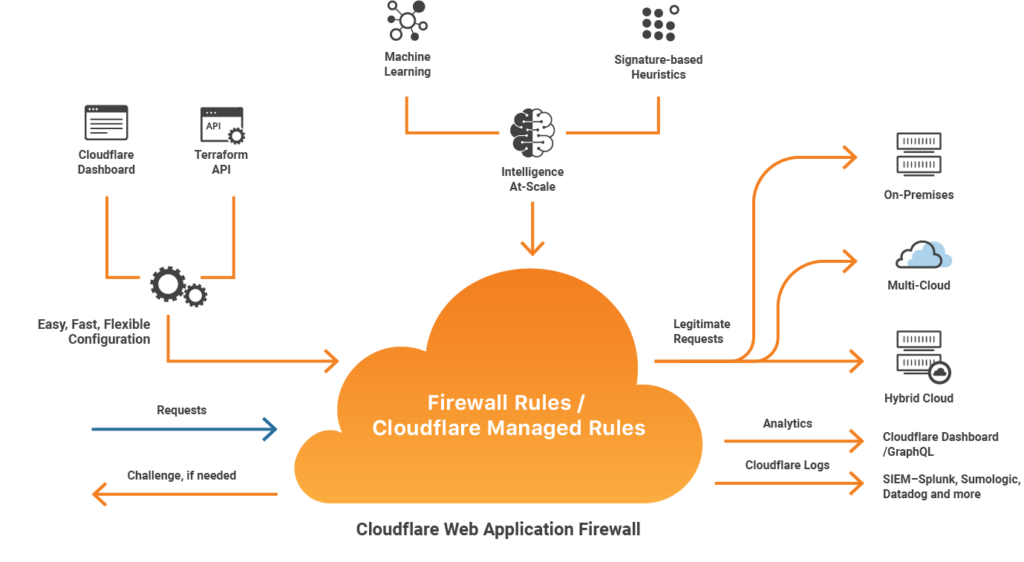
The beauty and power of using Cloudways is that you need not fork out thousands of dollars every year to get these super useful features. No… for $10 or less, you can enjoy all the capabilities of Cloudflare Enterprise—on top of the extensive suite of features that Cloudways also offers. Good examples of these include the RabbitMQ add-on, and a NewRelic Integration.
You can get a 20% Cloudways Discount by using our promo code ‘MANIAINC‘. We may get a commission when you do or when you get a Cloudways plan via one of our links.
Other Useful Cloudways Features that Build on Caching
RabbitMQ Add-On—Free
RabbitMQ
is a message queueing tool that queues tasks—such as sending emails, clearing caches, deleting transients, etc. Queueing these tasks ensures that they are executed one after the other (sequentially) and do not weight down on your server or database—by trying to be executed all at once.
Think of it this way, instead of everybody trying to use the ATM at the same time, RabbitMQ acts as a guard on your server, that ensures everyone at the ATM queues—and only one person can access it at a time.
Consequently, tasks are handled much faster and server resources are not weighed down by their execution. This can have a huge effect, especially when dealing with high-traffic or high concurrent usage.
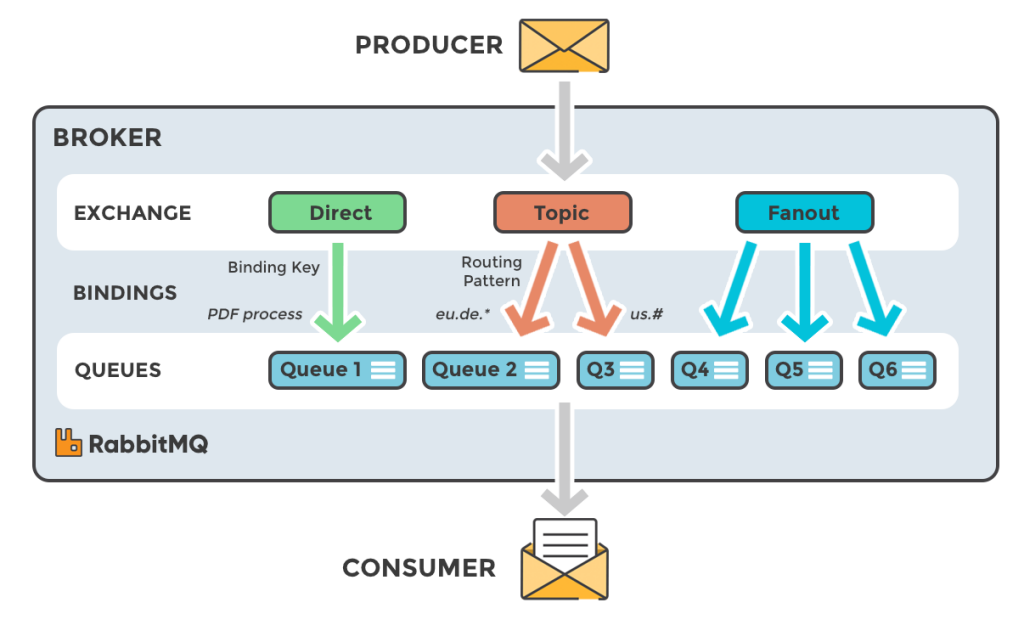
For instance, imagine thousands of learners taking a test (at the same time) on a LearnDash LMS site.
Each answer must be recorded and put to storage in the DB—with the correct tagging for the particular user (student), their details, and also checked against the correct answers for grading. If these tasks were to be executed all at once (at the same time), then your site would likely crash as the database would be unable to handle all these requests—and deliver accurate responses—in real-time.
RabbitMQ works to ensure that such a scenario does not occur and that there is efficiency during task execution—and it is fast… so fast. You’d think that tens or even hundreds of tasks would be slowed down when queued, but the opposite is actually true.
The WordPress database can execute fewer tasks much faster than it would be able to execute a huge number of tasks altogether.
Explore Cloudways’ Plans and find one that fits your SMB’s needs.
PS: We may earn a commission at no extra cost to you 🙂
NewRelic Integration—Free
The NewRelic integration on Cloudways is another hugely useful feature on Cloudways. As a WordPress developer, creator, or even a site admin, having insight into how your stack is performing, what’s working, what’s failing, and how fast everything works can make such a huge difference.
NewRelic is an analytics tool that provides just that—you get grain-like details about your stack, it’s modules, performance, response times, and even better, you can set thresholds for alerts.
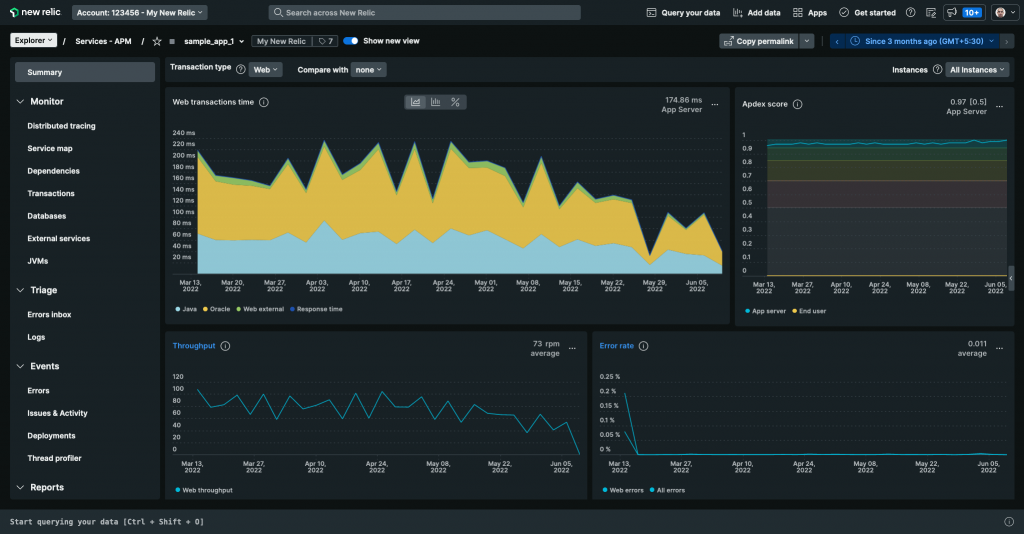 For instance, you can configure NewRelic to alert you if Apache takes more than 500ms to respond to a request.
NewRelic will alert you the moment the threshold is reached, and then allow you to see (and sift through) the numbers for your site’s Apache.
Such insight ensures that you’ll always stay on top of performance, and that you can effectively make decisions—to either tweak or upgrade your setup—as you’ll have the data and information you need to make said choices.
How to Configure the Edge Cache Layer of WordPress Caching on Cloudways
Edge caching acts as the global copy of your site—it reduces round trip time by delivering a cached page from a nearby edge server.
Consequently, a visitor in Nairobi, for instance, doesn’t have to wait on a US origin for static parts of your site.
Here are a few best-practices for configuring the edge cache layer of WordPress caching—Cloudflare Enterprise—on Cloudways.
- Only use ‘Cache Everything’ after you are confident that dynamic pages are excluded—otherwise combine the edge cache with origin cache control headers—or page rules—to ensure you exclude sensitive endpoints.
- For the best performance, combine Edge Page Caching with the Varnish server cache. With this config, Cloudflare can serve a cached page from the nearest edge server—and Varnish, on the other hand, can serve caches from the origin whenever a cache miss happens.
- For DNS and SSL configuration, use Cloudways’ one-click integration—as this approach will minimize manual certificate juggling or DNS flapping.
6) Unified Cloudways Caching Ecosystem — How the 3 Layers of Cloudflare Caching Interact
By employing caching on the 3 different layers, you can leverage the power of the Cloudways’ Caching Ecosystem. Here’s how traffic would flow:
- A request arrives at Cloudflare. With smart routing, Cloudflare serves cached copies of the requested resource—a cache hit.
- On a cache miss, however, the request goes through to Cloudways.
- Varnish checks its cache; and if a fresh copy exists, it serves the cached copy from server memory.
- If there’s a Varnish cache miss, the request is forwarded to Nginx/Apache -> PHP-FPM -> WordPress DB.
- Depending on the request, if Redis has a copy of the query’s response in memory, it is served.
- Alternatively, WordPress undertakes PHP processing and builds the response.
- The response is then stored in Redis (the returned DB objects) and Varnish (page cache).
- The request is then ferried back and could be potentially cached back to Cloudflare.
7) Real-World Results—How WordPress Caching is Improved on Cloudways
In the real-world, Varnish can accelerate content delivery dramatically, when configured correctly in a favorable architecture—according to the Varnish project.
Moreover, the Cloudways Lightning Stack comes natively optimized for performance; meaning that at its baseline, it will be very performant—with caching acting as an additional layer of optimization.
Even more, the Object Cache (Redis Pro) add-on is enterprise-grade software, offered entirely free of charge—an opportunity for savings and utility that you shouldn’t miss. Cloudways does partner with Redis, ensuring object caching on their server is well-configured to bolster performance.
To illustrate this, let’s take the case of a small blog, Techly. Before a robust caching setup, Time to First Byte (TTFB) was 1.8 to 2.5s. With Cloudflare edge + Redis + Varnish, however, TTFB fell to 0.3 to 0.7s.
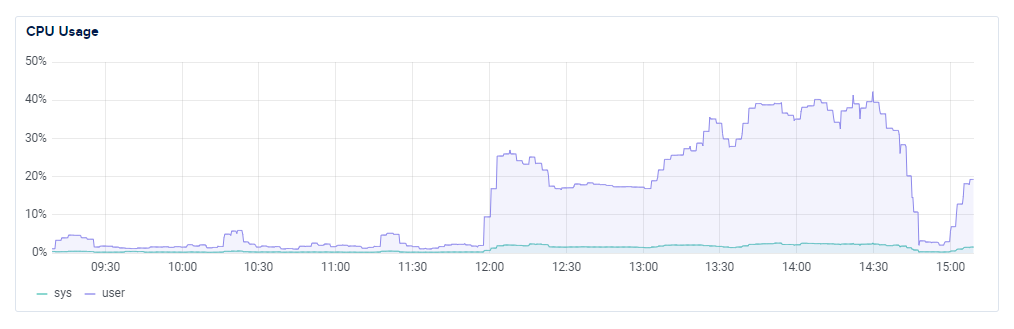
Similarly, a mid-size WooCommerce store, Umber, was able to reduce CPU load by between 50 to 70% (under normal traffic) just by enabling Varnish + Redis.
When traffic peaked, CPU bursts were handled for longer, without the need for autoscaling.
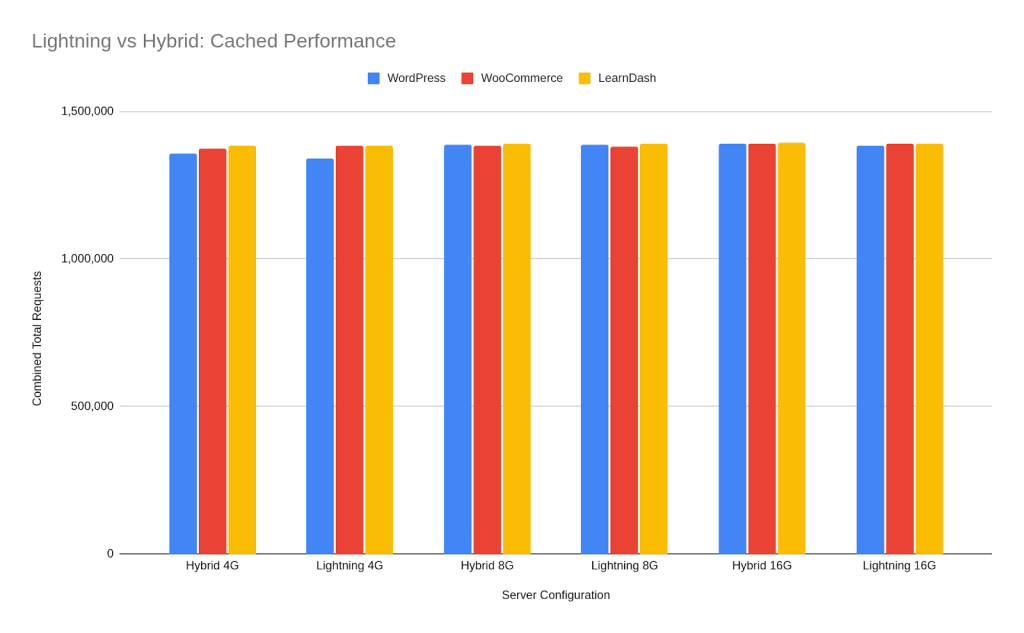
For WooCommerce or LMS LearnDash sites that use CPU-Optimized or High-Performance Servers + Lightning Stack, they were able to draw further performance gains—on top of the already 84% gained thanks to this powerful setup.
Related: Easy and Quick WordPress Optimizations with One-Click and One-Plugin Solutions
CPU-Optimized servers, for instance, use the latest CPU tech, and also very performant cores to reduce latency, and ensure millisecond speed gains. The same can be said for High-Performance droplets such as the Digital Ocean premium droplets.
It is important to always test performance, and you can do this using tools suchs as GTMetrix, Lighthouse, and WebPageTest. These tests would show you crucial metrics, include Core Web Vitals (such as LCP, TTFB, CLS, and Blocking Time).
Using Cloudways’ server dashboard, moreover, you can also get to see the cache-hit ratios—both at the edge cache and server cache levels.
You can get a 20% Cloudways Discount by using our promo code ‘MANIAINC‘. We may get a commission when you do or when you get a Cloudways plan via one of our links.
8) Getting Started with Server Caching on Cloudways
Getting started on Cloudways is super-simple, and you can follow these steps:
- Use this link and create a Cloudways account.
- Deploy a Cloudways server—choose a High-Performance or CPU-Optimized server if you expect heavy loads, especially for dynamic pages. This is the case for WooCommerce stores and LMS LearnDash sites.
On the other hand, if you are a small to medium-sized blog with small to medium traffic, then Cloudways’ standard servers will also do. - On the Cloudways server dashboard, head on to integrations tab and enable Varnish, Redis, RabbitMQ, and ElasticSearch. You can also enable the NewRelic integration, and set up a NewRelic account that you can link to your server.
- Deploy a WordPress/WooCommerce application in your server, and log into it with the provided credentials.
- Install the Breeze page cache plugin and enable page caching, GZIP compression, and the Varnish integration.
- Enable Varnish on Cloudways and configure exclusions for dynamic pages such as cart and checkout pages—as well as admin pages. Note that Breeze will handle these configs for you, just by enabling the Varnish integration on the plugin—so you can skip this step if you are already using Breeze.
- Looking at the tabs on the server dashboard, one of the last tabs on the left is the Cloudflare Enterprise settings tab. Head there and enable Cloudflare Enterprise. Toggle on edge page caching, Brotli, Polish, and Argo smart routing. You will also see available analytics.
- Validate the setup. Run cached and uncached tests on WebPageTest—and look out for first view and repeat view—and record cache-hit ratios, LCP, TTFB, etc.
- If you face any issues during the setup, use Cloudways CoPilot to diagnose and apply fixes. A solution that works most often, esp for Varnish, is restarting the Varnish service, purging the cache, or running a disk cleanup—Cloudways provides functionality for that.
9) Monitoring and Troubleshooting
Your site may be showing the following caching error symptoms and here’s how you can fix them.
Symptom: Old content shows; after you have made updates.
Cause: Breeze’s Varnish cache purge was not propagated to the server or to Cloudflare
Fix: If automatic purges by Breeze fail, you can try purging the caches manually as follows:
- Purge Breeze
- Purge Varnish from the server dashboard
- Purge the Cloudflare Cache from the server dashboard.
Symptom
: High CPU Usage under bursts.
Cause: Uncached endpoints due to cache misses or misconfigured Varnish rules.
Fix: Check cache-hit ratios on the Cloudways server metrics page, and in Cloudflare analytics. Alternatively, enable Varnish for more sensitive endpoints, but be careful with regard to dynamic pages. Additionally, you can try upgrading to a CPU-Optimized or High-Performance instance—these are specifically built for increased concurrent usage.
Symptom: Redis not saving keys
Cause: Redis is hitting memory limits or is misconfigured.
Fix: Increase the memory allocation for Redis, or increase its eviction policy limits. CoPilot can help you do this—as it can get technical—or you can reach out to Cloudways’ 24/7 support team.
Alternatively, you can refer to Cloudways’ stellar documentation on object caching.
Using CoPilot SmartFix to Troubleshoot Server and Caching Issues
Cloudways CoPilot is an always-on intelligent troubleshooting assistant that detects server issues in a timely manner
.
It has deep-integration with Cloudways’ server architecture and relies on knowledge of what’s happening on your site—and also similar fixes that have worked for others—to help you troubleshoot.
Couple this with Cloudways’ stellar documentation—and AI-powered knowledge from the web—and for any issues you face, CoPilot can help you troubleshoot.

It not only monitors the health of your server 24/7,but it also informs you of what’s happening (including the where and why). More importantly, CoPilot shows you how to fix the issue—even including code suggestions.
It may also suggest a ‘SmartFix’, which is a one-click fix for common server issues.
Try Cloudways CoPilot for Free: Get 6-Month CoPilot Credits
PS: We may earn a small commission at no extra cost to you 🙂
We wrote an in-depth guide on Cloudways CoPilot and you can check it out for more on how to leverage CoPilot for your stack.
11) Conclusion: Why Leveraging Caching is Important for your WordPress Site
Caching on WordPress is a layered strategy, and cannot just be ‘fixed’ using a single plugin
. Caching on WordPress needs to be integrated very specifically with your server and the caching tools therein. It should also be configured to work well with the edge cache.
The 3 caching layers can only bolster performance if they are structured and configured to work together—and in harmony with one another. This calls for a web host that has thoroughly understood what it would take to seamlessly integrate and coalesce these layers.
Related: Why Your WordPress Multisite Is Slowing Down — and How CPU-Optimized Hosting Can Fix It
Cloudways is just that web host who has taken the time, invested the resources, and applied their experience to ensure they set up a robust caching architecture.
Caching starts at the application layer with their powerful Breeze plugin. The plugin not only does page-caching, but also interfaces with the servers’ Varnish cache.
At the server layer, Varnish further enhances caching by collaborating with Redis Pro object caching, which Cloudways offers for free.
Cloudways didn’t stop there—they also offer the Cloudflare Enterprise Integration (at a heavily discounted price point); giving you everything you need to leverage caching for improved performance, SEO, and user experience.
The few milliseconds caching can help you save—for each page load—can be the difference between a growing number of conversions on your site—or last minute drop-offs; just when a customer is about to make a purchase.
The reason? Poor user experience, dysfunctional caching, slow load times, and overall poor implementation of caching—at the various levels.
Cloudways’ servers come with a custom, pre-tested, and highly performant cache infrastructure.
Hypothetically, you could mix all the modules we’ve mentioned yourself—or using a developer. However, not only will it take you ages, but you’ll also face insurmountable challenges as your host’s servers may not be cache-ready.
Cloudways’ servers are. They are built to natively support caching, have functionality for cache purges at all 3 levels—and the team has the expertise and experience to help you further customize the setup to your specific needs.
Better yet, you can now use Cloudways CoPilot to troubleshoot any issues you may have, without needing to start support tickets or send emails.

CoPilot is always-on and will be monitoring your server 24/7—and you won’t have to worry about always checking the dashboard.
Read our comprehensive guide on Cloudways CoPilot.
In our experience, no other host packages a plethora of performance-oriented add-ons like Cloudways does—and better yet, they are mostly complementary. These include add-ons for Redis Pro, RabbitMQ, a NewRelic Integration, ElasticSearch, and even their Staging Management and Backup Infrastructure.
With Cloudways you get flexibility, choice between the best and most performant cloud providers, and more importantly, the tech, features, and capabilities to grow your business—and leverage caching effectively.

Stop struggling to comb the internet for caching guides—the issue could be that your server is not built for caching.
Your server may be lacking the tools, setups, and infrastructure to support your caching aspirations. The problem could be that simple.
Don’t you think you deserve better?
I, for one, certainly think you do. Cheers. 🙂
You can get a 20% Cloudways Discount by using our promo code ‘MANIAINC‘. We may get a commission when you do or when you get a Cloudways plan via one of our links.
Be sure to check out our WordPress Optimization Guides and Tutorials for 2025 series for more articles on #WordPress and #WooCommerce… 😉
More from Mania Africa:
 How Cloudways CoPilot Makes WordPress Server Troubleshooting Easier and Saves You Hours (at a Fraction of the Cost of Hiring a DevOp Engineer)
  Maximize ROI for your SMB Website with Cloudways’ CPU-Optimized Servers + Lightning Stack: Scale for Long-term Growth at an Affordable Price
  Easy and Quick WordPress Optimizations with One-Click and One-Plugin Solutions